
How Do GPUs Perform Machine Learning Computations?
Introduction
When training models in deep learning frameworks, we usually use high-level APIs like model.fit(x, y) or jax.jit(f)(x). However, it is not easy to explain what procedures these calls go through at the actual hardware level. For example, let's look at what happens at the hardware level when a jax.numpy.dot operation in JAX is executed.
It looks like a simple matrix multiplication, but in reality, the following steps are performed sequentially: The Python interpreter passes the operation to JAX, and JAX passes it to the XLA compiler. XLA then optimizes the computation graph and generates a kernel for the GPU, and the driver loads the generated kernel into the GPU command queue. Finally, the GPU scheduler distributes the kernel to thousands of execution units for execution.
Deep learning frameworks and GPGPUGeneral-purpose computing on GPU technologies automate and abstract most of these complex processes, so users often don't need to be aware of them. However, without understanding these underlying principles, it can be difficult to optimize performance or analyze the causes of problems. For example, understanding why OOMOut of Memory occurs at a specific batch size, why crashes due to memory fragmentation occur even when memory seems sufficient, or why speed decreases due to kernel execution overhead despite low computation volume requires an understanding from a hardware perspective.
In this article, we will sequentially explain the processing process from the Python code execution stage to hardware resources. By the end of this article, you will be able to understand:
- The entire execution process from Python code to hardware
- How commands are processed from inside the GPU
- Performance optimization utilizing hardware characteristics
Principles of Machine Learning and Deep Learning
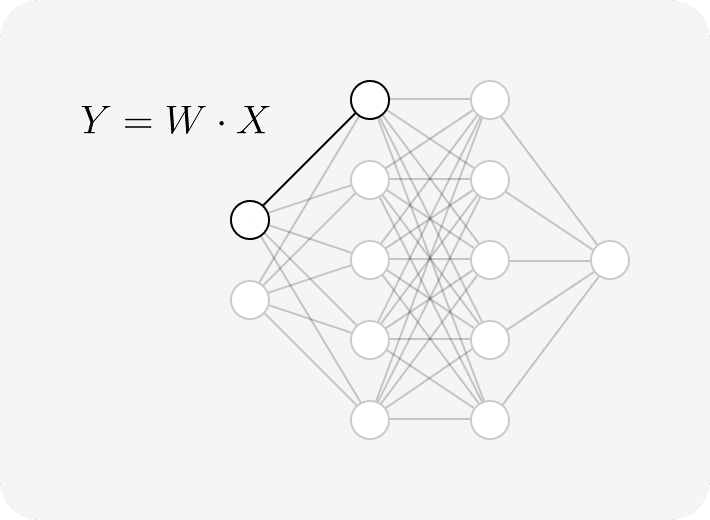
Training and inference of machine learning and deep learning models can generally be seen as a sequence of tensor [1] operations. The process of a model with millions to billions of parameters taking input and calculating output appears as follows:
This consists of a combination of matrix multiplication and element-wise operations.
The Importance of Parallel Computing
Most deep learning model structures perform GEMMGeneral Matrix Multiply operations. This corresponds to BLAS Level 3 operations and is expressed as follows. [BLAS]
If matrix is and is , the result becomes .
Here, BLAS defines linear algebra operations as Levels 1 to 3. GEMM, which is an operation between matrices, corresponds to Level 3 in BLAS. Let's look at the meaning of each BLAS Level.
- Level 1: Element-wise operations
- Level 2: Vector-matrix operations
- Level 3: Matrix-matrix operations
Level 3 operations have a large computation volume of compared to the data movement volume of . In other words, since the arithmetic density is high, they have Compute Bound characteristics. This is advantageous for maximizing the GPU's floating-point performanceFLOPS. The pseudo-code below shows why data movement and computation volume are derived from the above formulas.
Data access requires approximately , , and for A, B, and C respectively, so the total movement volume is . The computation volume is , so it is .
Tasks with high arithmetic density can fully utilize the GPU's FLOPS, but conversely, operations with low computation volume and large data movement volume can be bottlenecked by memory bandwidth. Accordingly, modern deep learning compilers perform optimizations by converting as many operations as possible to GEMM or by fusing element-wise operations to minimize memory access.
Backpropagation
Backpropagation, the training process of deep learning models, is the process of finding the gradient of parameters with respect to the loss function through the chain rule [2]. For example, in the case of a linear transformation like , the gradient is given as follows:
In the backpropagation process, matrix multiplication operations occur just like in forward propagation. Therefore, in deep learning training, it is necessary to efficiently perform GEMM operations included in not only the Forward Pass but also the Backward Pass.
Also, since the input and output gradient required for backpropagation calculation must be preserved, memory usage increases during the process of storing activations. This makes GPU memory capacity a major constraint, and technology such as Activation Checkpointing is used. [3]
Looking at the code above, we can infer that backpropagation also internally involves another matrix multiplication.
Limitations of CPU and GPU, NPU
Unless it is for special purposes such as deep learning or graphics processing, operations are generally performed on the CPU. So why perform deep learning on a GPU? To understand this, we need to look at the design purpose and philosophy of each architecture. The following video illustrates the characteristics of CPU and GPU well.
Characteristics of CPU
The CPU is a general-purpose processor designed to minimize Latency and handle complex control flows quickly.
- Complex Control Processing: The CPU has a sophisticated control unit internally to quickly process conditional branches like
if~else, function calls, and various instruction flows. Therefore, it is strong in tasks with many branches and controls, such as web browsing, operating systems, and game logic. - Cache Utilization: The CPU has multi-level caches like L1, L2, and L3 to quickly retrieve frequently used data. Since general programs often use the same data repeatedly, it is advantageous to store and use frequently used data in the cache.
- Vector Operations Possible but Limited Scale: The CPU can also calculate multiple data at once through vector operation instructions like AVX. However, since the amount of data that can be handled at once (register size) is small and the number of cores is small, there is a limit to tasks that require processing thousands to tens of thousands of operations simultaneously, like deep learning. [4]
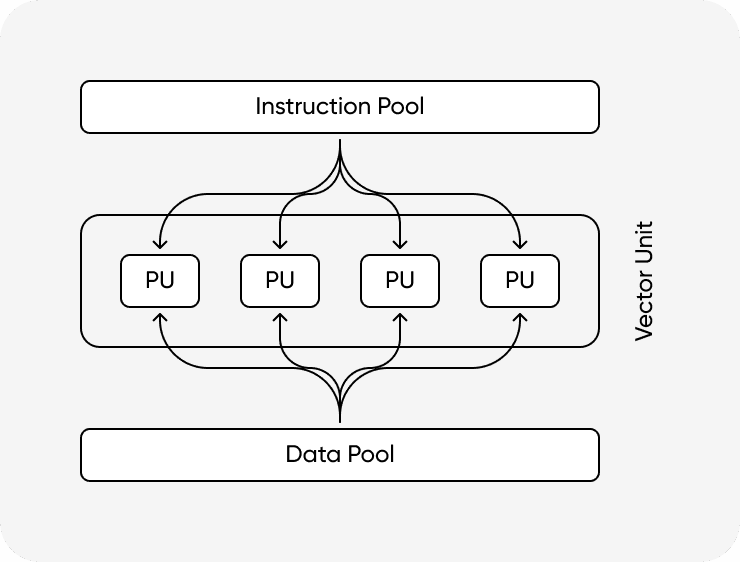
CPU's SIMDSingle Instruction Multiple Data technology is a method of processing multiple data at once with a single instruction. For example, using AVX-512 instructions, 16 32-bit floats can be calculated simultaneously with a single 512-bit register. However, this method is still at the level where a small number of cores inside the CPU briefly accelerate vector operations, so the scale is relatively small compared to the parallel processing capability of the GPU where thousands of operation cores distribute work simultaneously. Also, since the CPU has a large proportion of circuits for branch processing or complex logic, there are structural limitations to putting many arithmetic units solely for pure calculation.
GPU
The GPU is designed to maximize Throughput by executing simple instructions in parallel with thousands of cores performing simple operations.
- Thousands of Calculation Cores: Although they don't do complex work as well as CPU cores, they can run many more cores at once, so they can process massive amounts of operations simultaneously.
- Utilizing High-Bandwidth Memory (HBM): The GPU is not only fast in calculation but also very fast in reading and writing data. By using high-bandwidth memory like HBM, it can supply data several times faster than CPU memory. It is advantageous for tasks where data must flow continuously, such as deep learning.
- Processing One Instruction with Multiple Threads: The GPU is optimized for a structure that repeats similar operations at once. For example, an instruction that multiplies all elements of a matrix equally can be applied to tens or hundreds of threads simultaneously. This method maximizes the parallelism of the GPU.
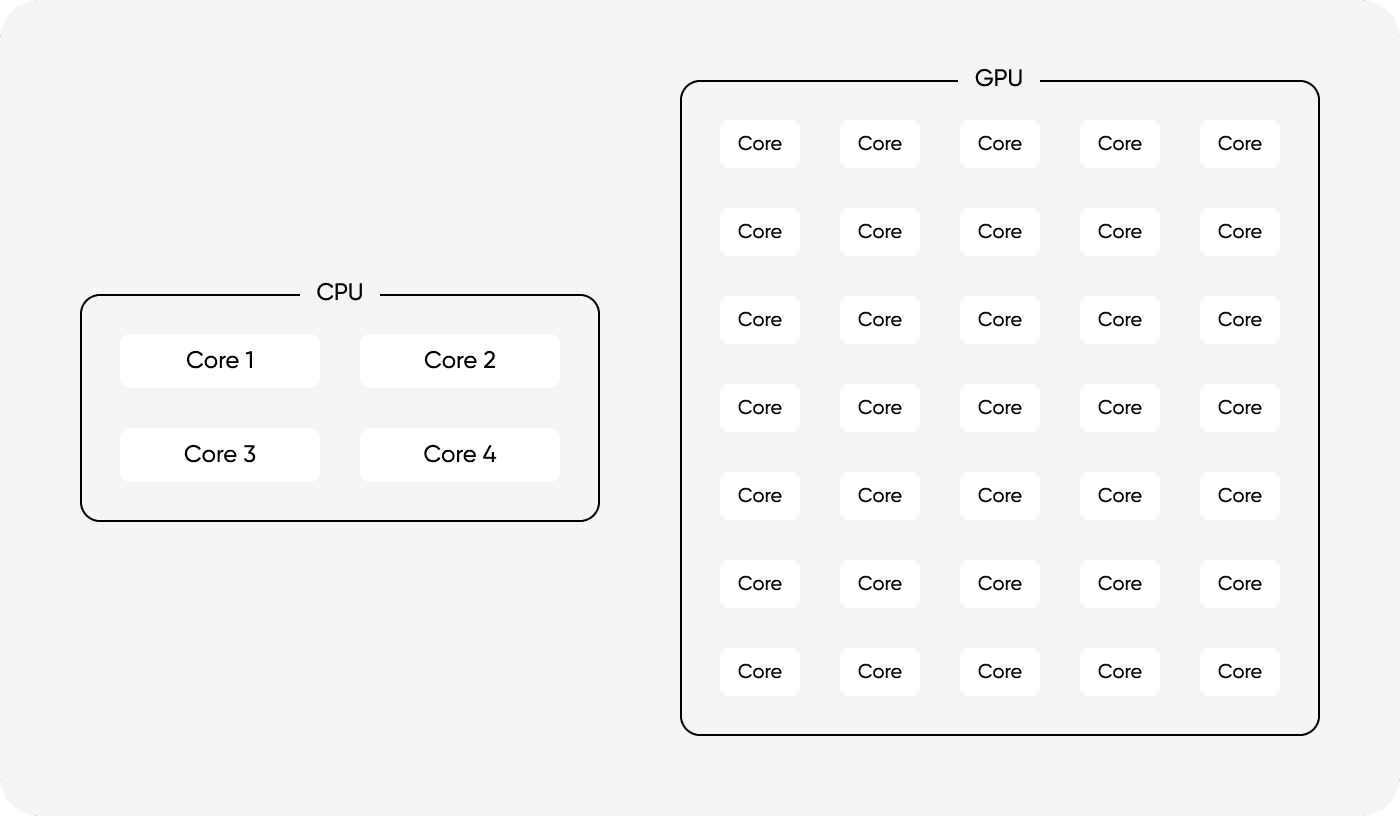
The figure above shows that the CPU and GPU are designed with different purposes in mind. The CPU is configured to reduce the latency of individual tasks by having a small number of cores capable of complex operations, a large cache, and a sophisticated control unit. On the other hand, the GPU focuses on increasing the amount of work that can be processed simultaneously by arranging a large number of relatively simple cores and sharing the control structure. Due to this difference, the GPU can demonstrate high processing efficiency in tasks that process large-scale data in parallel.

GPU uses SIMTSingle Instruction Multiple Threads structure to process deep learning operations quickly. Similar to the CPU's SIMD examined earlier, one instruction applies to multiple data, but the difference is that the GPU uses a method where multiple threads share the same instruction and execute it simultaneously. Also, the GPU contains significantly more arithmetic cores than the CPU. due to these characteristics, the GPU has many advantages in parallel computing. While a desktop CPU typically has about 4 to 16 arithmetic cores, a GPU is equipped with thousands of arithmetic cores, enabling simultaneous processing of massive operations.
NPUNeural Processing Unit
NPU goes a step further here, giving up the versatility of operations and is a processor specialized only for deep learning operations. CPU or GPU minimizes general operations (scheduling, graphics operation processing, code logic processing, etc.) control logic and fills most of the chip with Matrix Multiply Units to maximize power efficiency and arithmetic density for deep learning training and inference. Google TPU, AWS Inferentia, etc. fall into this category.
| Feature | CPU | GPU | NPU |
|---|---|---|---|
| Goal | Fast sequential execution of complex logic | Large-scale parallel data processing | Hardware acceleration dedicated to matrix operations |
| Core Structure | Small number of complex cores | Thousands of simple cores | Thousands of simple cores |
| Memory | DDR | HBM | HBM |
| Control Unit | Largest | Relatively small | Smallest |
| Flexibility | Very High | High | Low |
| Interconnect | PCIe, QPI/UPI | PCIe, NVLink | Proprietary (e.g., ICI) [5] [6] |
Relationship between GPU and CPU
The GPU is not a device that executes programs alone, but a co-processor that executes commands issued by the CPU. The CPU is responsible for the overall coordination, such as program flow control, data preparation, and which kernel to execute when.
Data Transfer
For the GPU to calculate, data must first be sent to the GPU memoryVRAM. At this time, data moves from system memoryRAM to the GPU, usually transmitted via the PCIe bus. [7]
Thanks to Direct Memory AccessDMA technology, the CPU does not need to move data directly during this process. However, since PCIe bandwidth is much slower than the speed processed inside the GPU (HBM memory), minimizing the transmission amount is important for performance optimization. [8]
DMADirect Memory Access is a technology that allows the CPU to not directly manage every byte movement in the data transfer process but only check the start and end of the transfer. When the CPU orders the DMA controller to "move this data over there," the actual data movement is performed by the DMA engine, and the CPU can handle other tasks. Since gigabytes of weights and data must be transferred to the GPU every epoch during deep learning training, efficient DMA utilization has a significant impact on the overall training speed.
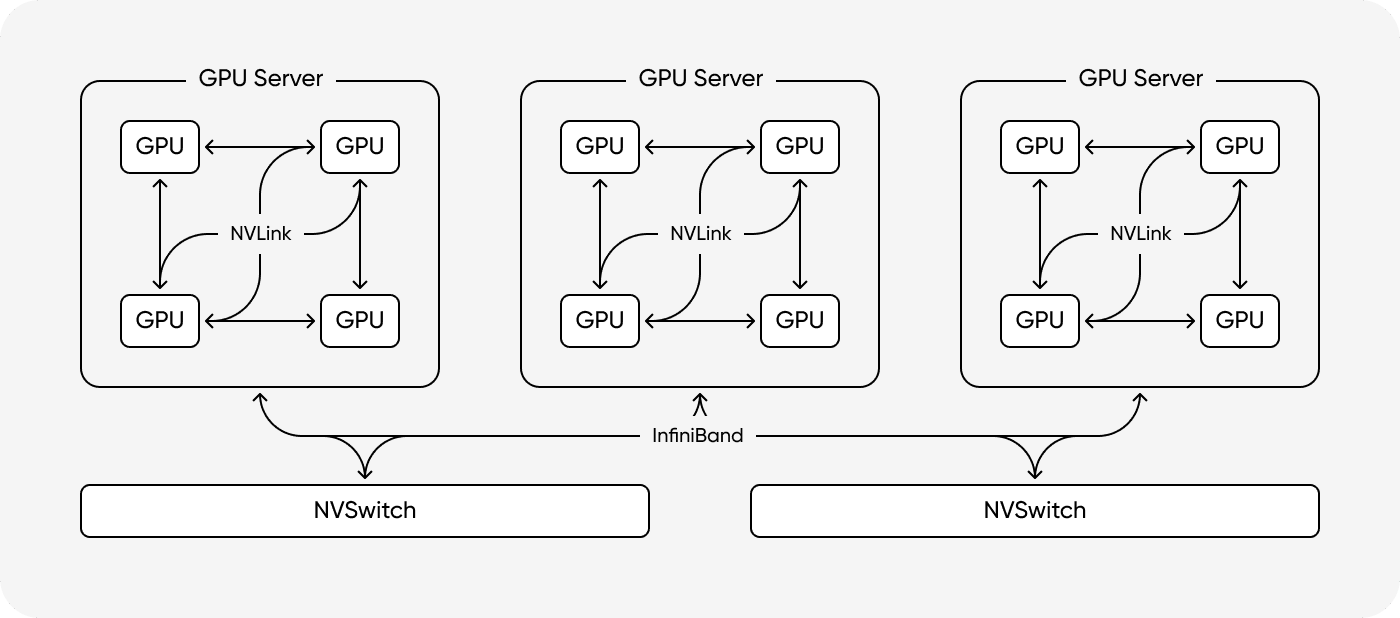
When building a multi-GPU environment to overcome the performance limits of a single GPU, a high-speed interconnect (e.g., NVLink) that allows GPUs to communicate directly instead of the slow PCIe bus is essential. The diagram above shows the structure where GPU cores are connected in a mesh or ring bus form inside the chip, or connected via high-bandwidth links externally. These interconnects dramatically reduce memory copy time between GPUs, making them a key technology for resolving bottlenecks in distributed processing environments such as Large Language ModelLLM training. [NVLink] [InfiniBand]
CPU and GPU Communication via Command Queue
The CPU sequentially delivers commands such as operation processing or data copying to the GPU. At this time, the GPU does not execute the command immediately upon receipt but takes requests loaded in the Command Queue one by one and processes them asynchronously.
GPU operations do not start until a CPU command comes in. If the CPU tries to use the result before the GPU completes the task, there is a possibility that the operation has not yet been completed. Therefore, you must synchronize the results using APIs such as cudaDeviceSynchronize() or control the execution order with CUDA Streams.
A preparation time of about 3~5 μs is required from when the CPU puts a kernel execution request into the queue until the GPU takes it out and executes it. If the kernel itself is a small-scale operation of about 1 μs, the preparation time may exceed the execution time, resulting in degraded performance. For this reason, in practice, strategies to reduce the number of kernel executions using techniques such as CUDA Graph and Kernel Fusion are important.
Deep Learning Frameworks and Hardware Kernels
Deep learning frameworks like PyTorch or JAX play the role of changing code written by the user in Python into operations that can be executed on actual hardware. Even if we write simple code like x + y, the framework internally makes this into a computation graph and determines in what order to calculate and what can be executed simultaneously.
How are Operators Connected to GPU Kernels?
Inside the deep learning framework, there is a Dispatcher that automatically matches which hardware kernel the function called in Python should use. Let's look at the following example.
When meeting code like the above, the framework selects the appropriate CUDA kernel by looking at (1) Tensor Type [9] (2) Device [10] (3) Tensor Shape [11]. Matrix multiplication like torch.matmul automatically uses the cuBLAS library pre-optimized by NVIDIA.
Necessity of Kernel Fusion and JIT
Since Python is an interpreter language, if small operation units are repeated, Python → CUDA calls occur every time, failing to fully utilize the execution unit of the GPU. To reduce this overhead, modern deep learning frameworks are introducing (1) Kernel Fusion, which bundles multiple operations into one kernel, and (2) JITJust-In-Time compilation, which compiles and reuses frequently performed calculations. Through this, Python call costs can be reduced and GPU operations can be performed at high speed.
The JIT compiler analyzes Python operations at runtime, converts them into Intermediate RepresentationIR, and optimizes them, for example, by combining operations in the order of Add → Mul → ReLU into a single kernel. This process reduces the number of memory accesses and removes Python dispatcher calls, improving overall execution efficiency. Let's look at the example below.
- GPU kernel calls occur for each at the Python level
- Global memory access is required between each call
- Overhead increases, causing delays due to calls and memory access rather than the operation itself
If these operations are fused into a single kernel, the input needs to be read only once, operations performed in registers, and the final result written only once. This is a representative software technique to alleviate Memory Bound situations. The following is an example in JAX.
JIT compilation goes through the following process:
- Converts Python operations to XLA's HLO IR.
- Fuses
mul+add+reluinto one kernel during the HLO graph optimization process. - Integrates global memory access into one.
- Performs operations within GPU registers and records only the result.
Finally, the compiled kernel is converted into CUDA → PTX → SASS format and executed on the GPU, internally following a procedure similar to the following. [PTX] [SASS]
load x, y, z- Process
mul → add → reluin registers store result
As such, JIT and kernel fusion reduce Python calls and memory access, allowing effective utilization of GPU computing resources.
GPU Processing Process from a Kernel Perspective
When a kernel is executed, a huge number of threads operate simultaneously inside the GPU. These threads are bundled into a structure called Grid → Block → Warp and executed.
GPU Thread Structure
- Grid: The entire set of threads created when a kernel is executed once. That is, it means all threads required for this kernel execution. The Grid is distributed across the entire GPU.
- Block: A Grid divided into several bundles. Blocks are placed in the SMStreaming Multiprocessor, which is the calculation unit of the GPU, and threads within a Block can quickly share data.
- Warp: The actual hardware execution unit. In NVIDIA GPUs, 32 threads are bundled into one Warp and execute the same instruction simultaneously.
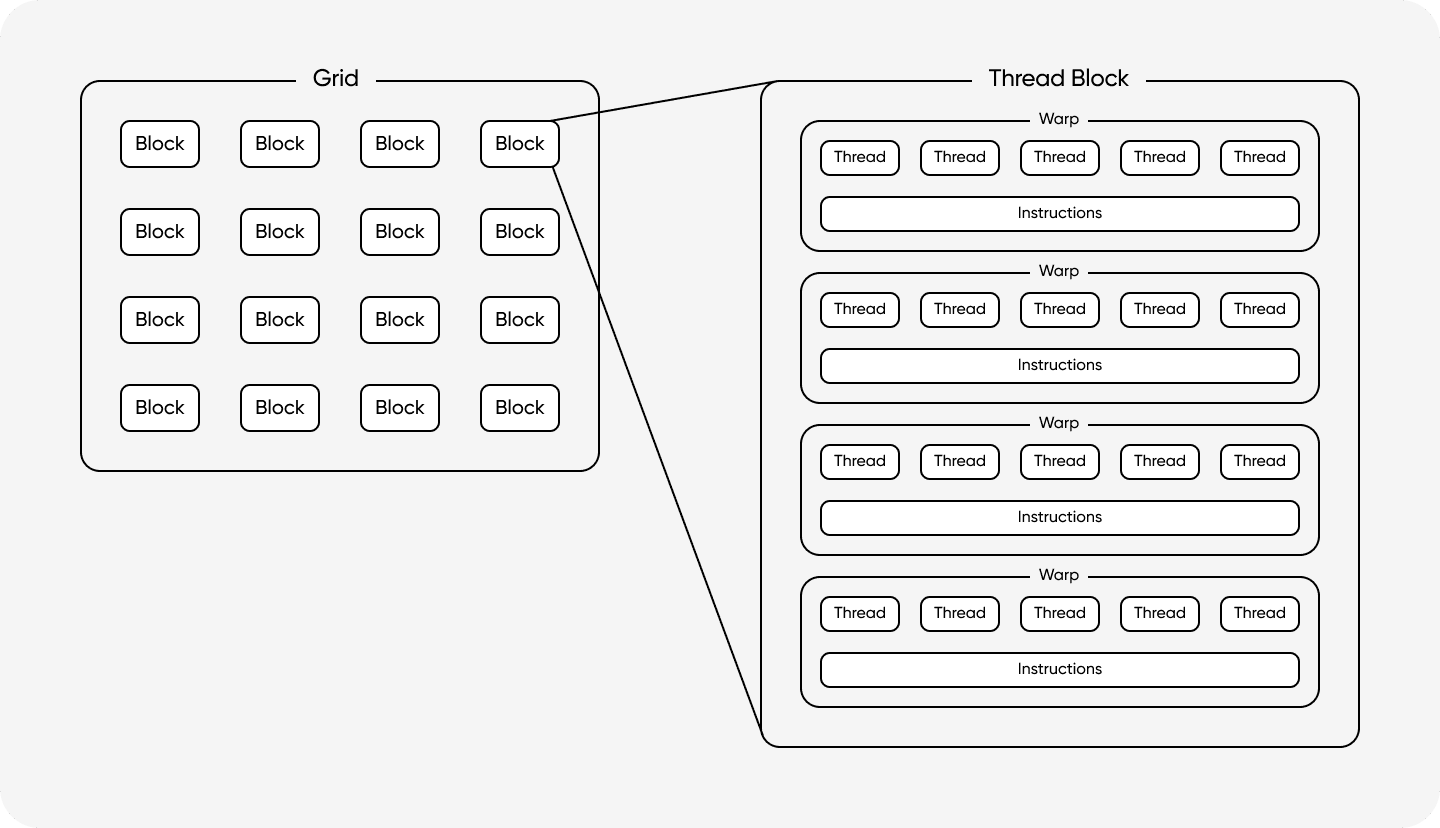
The figure visualizes the hierarchical structure leading to Grid → Block → Warp → Thread. The Grid on the left represents the entire work area, and the work within it is divided into multiple Blocks. The right shows an enlarged view of one Block, indicating the structure where threads inside the Block are bundled into multiple Warps. Threads within each Warp share the Instructions shown below and always execute the same command simultaneously. In actual hardware, a Warp usually consists of 32 threads, and this Warp unit is scheduled and processed in parallel by cores inside the SMStreaming Multiprocessor. Thanks to this hierarchical structure, the GPU can efficiently organize and manage hundreds of thousands of threads while applying the same code to massive datasets at once.
Structure of SM
As seen earlier, each Block is executed in an arithmetic unit called SM inside the GPU. Inside the SM, there are the following resources:
- Register File: A space called a register file exists in each SM. (256KB based on H100) This is much larger than the CPU's register file. Dedicated registers are allocated for each thread, and since there is no need to save and restore registers during context switching, the overhead is very small.
- Shared Memory: A high-speed memory located inside the SM that users can control. It is mainly used for communication between threads within a block.
- L1 Cache: Used to reuse repeated data access.
One of the reasons GPUs are fast is that registers and shared memory are relatively large and designed for massive parallel processing.
Warp Scheduling
The GPU does not stop while fetching data from memory. For example, if Warp A tries to access memory and a wait occurs, the Warp scheduler switches to executing Warp B. In other words, if one Warp rests, another Warp comes in immediately and calculates, which is efficient. The GPU is more effective in concurrency processing than the CPU in that scheduling occurs immediately internally without a context switching process like the CPU.
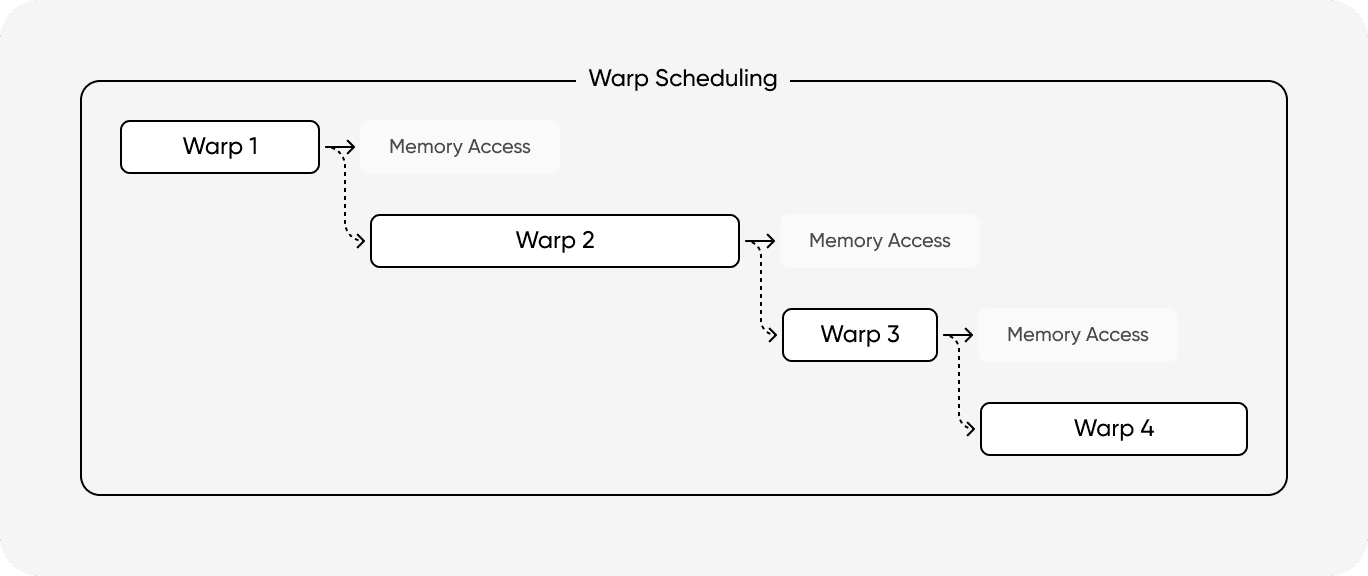
This structure has advantages in processing data in parallel, but there are also disadvantages. If threads within a Warp meet an if-else statement and branch to different paths, the GPU must execute both paths sequentially.
- First, only threads where the
ifcondition is true are activatedActive, and false threads execute instructions in a deactivatedInactive state. - Then, only threads taking the
elsepath are activated to execute instructions.
As a result, execution time doubles, and hardware utilization drops by half. Therefore, in GPU kernel code, branch statements must be minimized, or all threads within a Warp must be induced to take the same path.
How is TPU Different?
TPUTensor Processing Unit is a deep learning-specialized chip designed by Google and corresponds to an NPU. If a GPU is an accelerator generally used in graphics or deep learning, a TPU can be seen as a specialized chip designed to speed up deep learning calculations from the beginning.
Systolic Array
TPU uses the Systolic Array architecture. While GPUs keep retrieving data from registers or memory every time they calculate, TPUs are designed so that calculations continue naturally as data flows through the arithmetic units. To explain simply,
- Input comes in from the left
- Partial sum comes down
- Calculation is accumulated sequentially
As seen in the example, it is called a Systolic Array because data flows like a heartbeatSystolic and operations continue. This flow dramatically reduces the number of register accesses, increasing power efficiency.
Method of Fixing Weights in Advance
TPU has a structure where weights are fixed in advance in the arithmetic unit and only inputActivation continues to flow. This method is called Weight Stationary. This method can reuse the same weights continuously, greatly saving memory bandwidth. In other words, it is a structure that reduces I/O, which often causes inefficiency in deep learning calculations.
Execution Method
GPUs have complex features like Warp scheduling, branch processing, and dynamic parallelism, but TPUs do not need such processes. Instead, they execute exactly in the order determined by the compilerXLA. Therefore, overhead is low even in a large-scale TPU Pod environment where hundreds to thousands of TPUs must be driven. The communication method between chips is also different. TPUs are directly connected by a dedicated network called ICIInter-Chip Interconnect and can be bundled into a 3D Torus structure. It has a completely different design philosophy from GPU's PCIe/NVLink, and this method is particularly advantageous when building a deep learning training cluster that needs to train large-scale models.
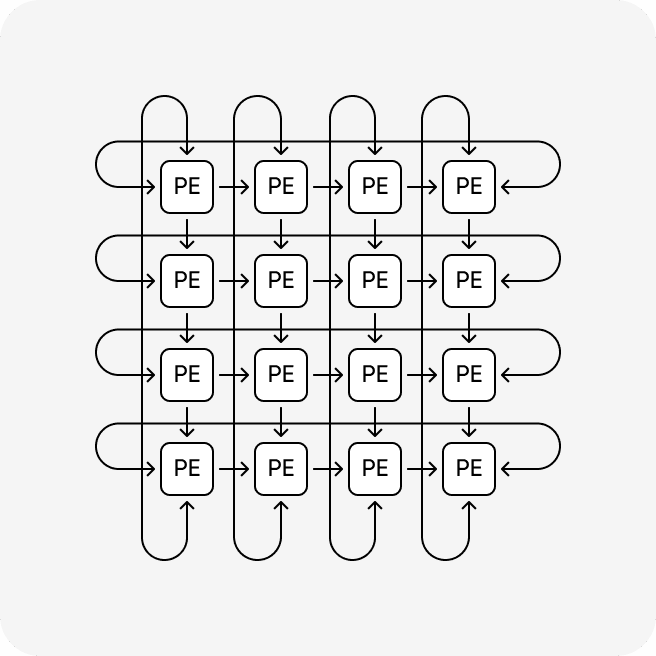
A systolic array is a structure where data flows in a constant direction inside the chip and operations are performed. Like its name, it simulates the heartSystolic continuously circulating blood in the body. Each cell (marked as PEProcess Element in the figure above) performs basic operations like multiplication and addition and then passes the result directly to the adjacent or lower cell. This reduces the need to continuously store intermediate results in memory and retrieve them again, and data is reused multiple times as it passes through like a flow. This reduces unnecessary memory access, increasing energy efficiency and significantly reducing power costs when training large-scale models.
Interconnect Advantageous for Large-Scale Expansion (Inter Chip Interconnect)
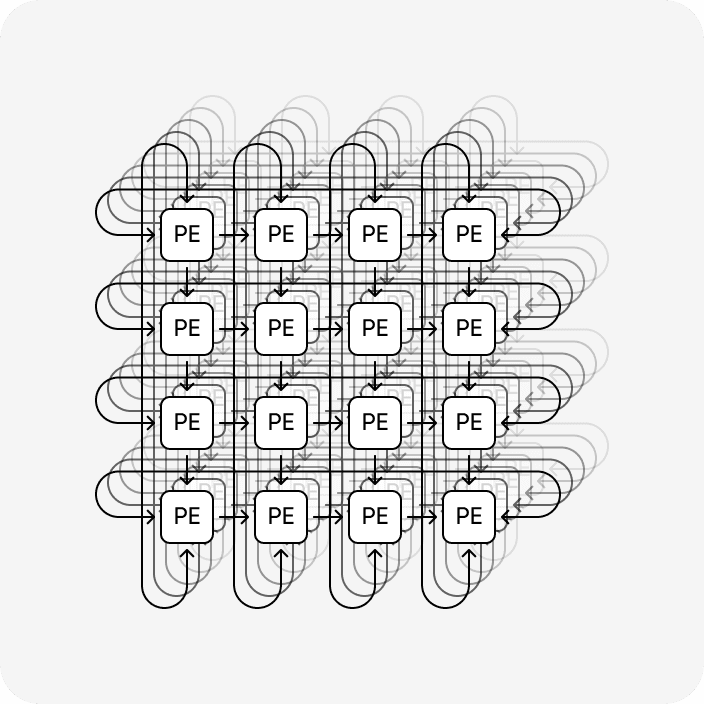
TPU considers not only the performance of individual chips but also how to scale when thousands of chips are connected as a single system as top priority. If adjacent chips are directly connected like the 3D Torus structure in the figure above, data can be exchanged at high speed without passing through a separate network switch. This method minimizes bottlenecks that can occur in communication between chips when training huge models, allowing for linear performance expansion expectation. TPU 3d Torus Topology Reference Paper
Consequently, while GPUs are designed to be used for various purposes from graphics processing to general parallel operations, TPUs are specialized hardware that simplifies the structure and maximizes operation efficiency tailored for deep learning calculations. Therefore, they show very high efficiency in large-scale matrix operations like deep learning, but are difficult to use as universally as GPUs for other purposes.
XLA HLO
JAX and TensorFlow use the XLA compiler to optimize hardware performance. In this process, the program is converted into an intermediate representation called HLO, and various optimizations are applied regardless of hardware. XLA HLO Reference
- Fusion: Merges multiple operations into one kernel to reduce execution overhead and memory access.
- Buffer Assignment: Determines the memory location and lifetime of tensors in advance at the compile stage to reduce memory allocation and deallocation costs during execution and prevent memory fragmentation.
The optimized HLO is changed again into commands suitable for each hardware. For example, in GPUs, it is usually converted to PTX code via LLVM and then finally compiled into machine code (SASS) executable on the GPU.
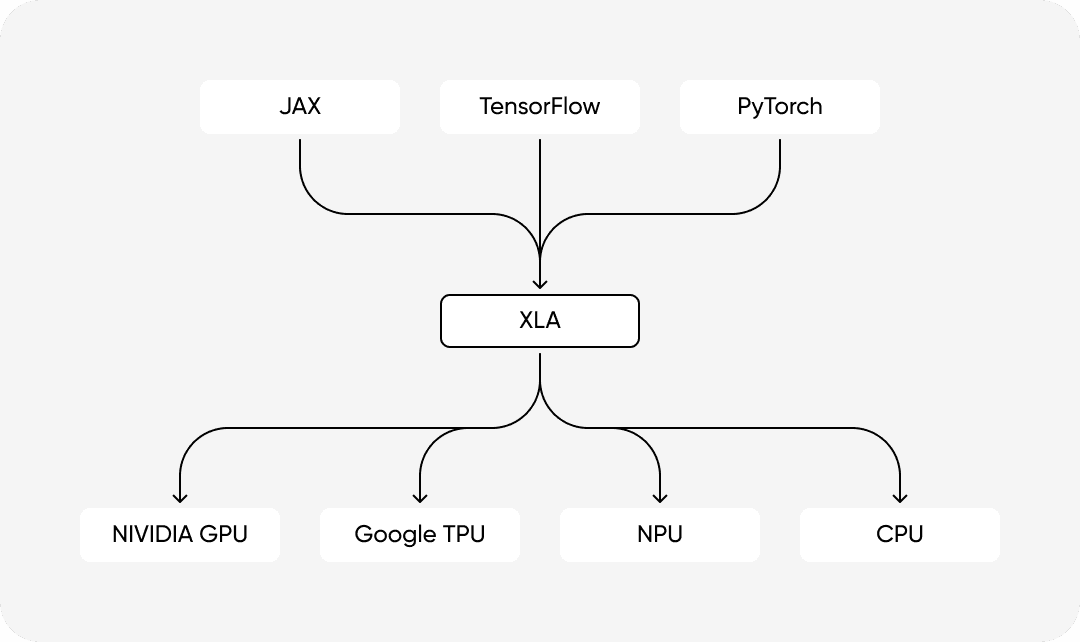
XLA's optimization pipeline proceeds broadly in the order of Parsing, HLO Optimization, and Backend Code Generation. It analyzes user code to generate a hardware-independent HLO graph, and then performs various optimizations such as Fusion, Common Subexpression Elimination (CSE), and buffer reuse. The refined graph is essentially translated into GPU (PTX/SASS) or TPU machine language. Thanks to this, developers can obtain the best performance by writing logical operations without knowing the complex characteristics of the hardware.
So, What is the GPU Operation Process from a JAX Model?
Returning to the question of this article, let's look at what steps are actually performed when c = jnp.dot(a, b) is called.
1. Python Execution
When a user executes a jax.jit-ed function, JAX first analyzes the Python code to create a computation graph. At this time, it identifies the operation flow by looking only at meta-information like shape and dtype, not actual values.
2. Pass to XLA for Optimization
The generated graph is passed to the XLA compiler. XLA first converts the computation graph into an intermediate representation called HLO. At this stage, it optimizes by combining operations following dot (+, relu, etc.) into one large operation or preventing the creation of unnecessary tensors. HLO can be seen as hardware-independent intermediate code.
When hardware-independent optimization is completed at the XLA stage like this, PTX code that the GPU can understand is generated afterwards.
3. Generating Code that GPU Understands XLA finally generates PTX that the GPU understands. The following is a simplified example of the generated low-level code.
4. GPU Driver Compiles PTX to Machine Code The GPU driver compiles PTX into SASS suitable for the currently running GPU architecture. Deep learning matrix multiplication operations are converted to HMMA instructions for Tensor Cores instead of the general FP scalar FMAFFMA path if conditions are met.
5. Loading into GPU Memory The compiled SASS code is loaded into GPU memory, and preparation for kernel execution is complete.
6. Copying Data to GPU
Inputs a and b are moved from CPU memory to GPU memory via PCIe, DMA, etc. And they are prepared for use inside the GPU.
7. Kernel Execution The CPU puts a command to execute the compiled kernel into the GPU command queue. This command includes execution parameters such as grid size, block size, and shared memory size. The GPU divides this kernel into thousands of cores and executes it. In this process, SM allocation and Warp scheduling discussed earlier are performed.
8. Performing Tensor Core Operations
The SASS HMMA instruction is executed to perform matrix multiplication in Tensor Cores. Tensor Cores can perform matrix multiplication in one cycle. [12]
9. Writing Results
Operation results are accumulated in registers or shared memory. Calculations are completed in on-chip memory as much as possible before writing final results to global memory. When all operations are finished, the final result c is recorded in HBM. Since it is mostly used as input for the immediately following operation, it often does not return to the CPU.
10. Copying Final Result to CPU Memory If necessary, the final result is copied back to CPU memory via methods like PCIe, DMA, etc. However, during deep learning training, most data stays on the GPU and is used as input for the next operation.

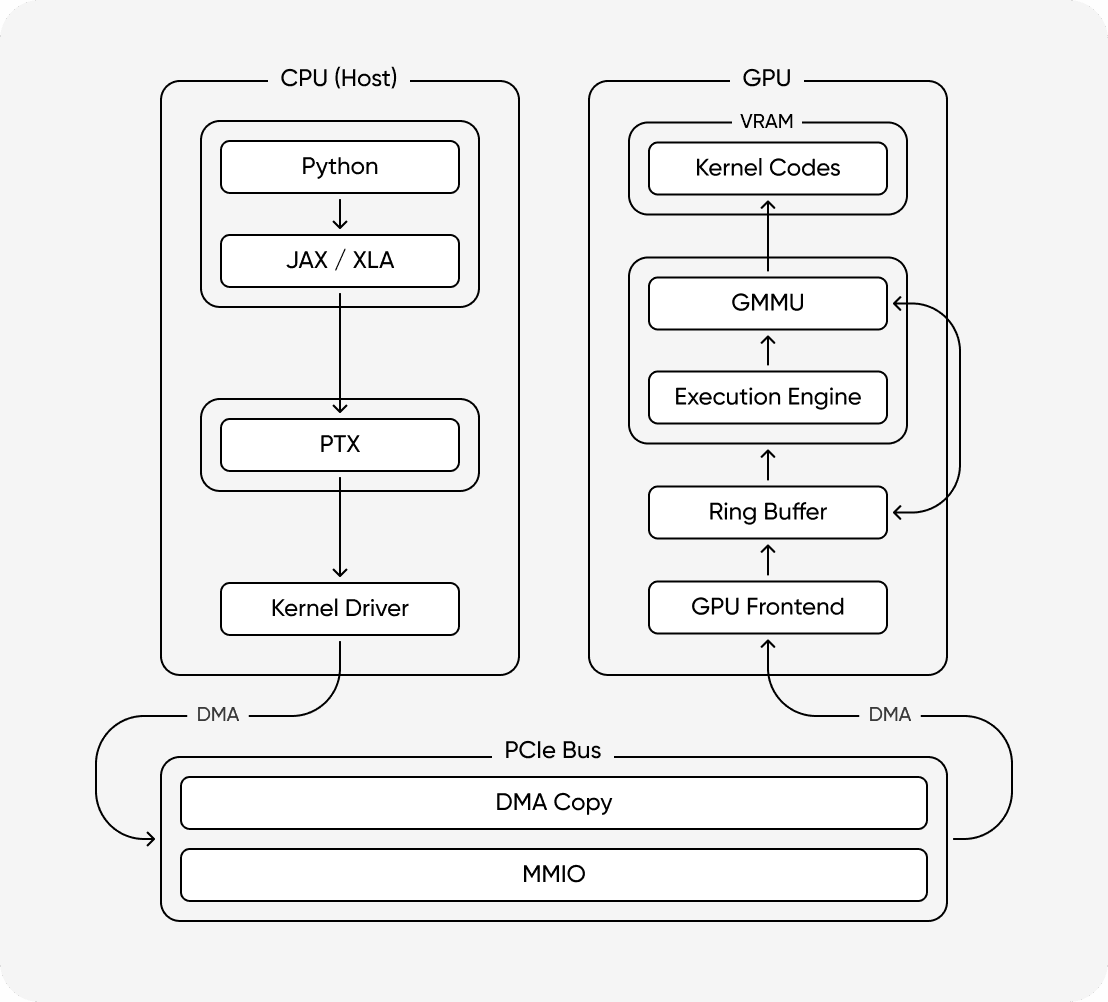
This diagram summarizes the key steps from Python code execution to actual operation on GPU hardware. First, operations defined in Python and JAX are converted into an intermediate representation via XLA, and then compiled into instructions that the GPU can understand through LLVM and PTX stages. Afterward, the compiled code and necessary data are transferred to the GPU via PCIe, and inside the GPU, they are executed in parallel on multiple arithmetic units through the warp scheduler and execution pipeline.
In the deep learning training process, most intermediate results remain in GPU memory and are passed to the next operation, returning to the CPU only when necessary. This allows the CPU and GPU to share roles, ensuring that operations are continuously performed on the GPU.
Conclusion
Through this article, we examined the fact that simple function calls like jnp.dot are actually performed using thousands of operation units on the GPU. Code written at the Python interpreter level is converted into a hardware-friendly form through JIT and XLA, and finally compiled into machine code executable on the GPU. Although this process is all automated, internally it strictly includes complex optimization and hardware control.
Hardware for AI operations is becoming increasingly specialized and designed for specific purposes. Google TPU v7 has been developed with a focus on scaling to large-scale Pod configurations by bundling multiple chips, and NVIDIA's next-generation architecture, Blackwell, also targets large model training environments by introducing new precision (FP8) and memory structures.
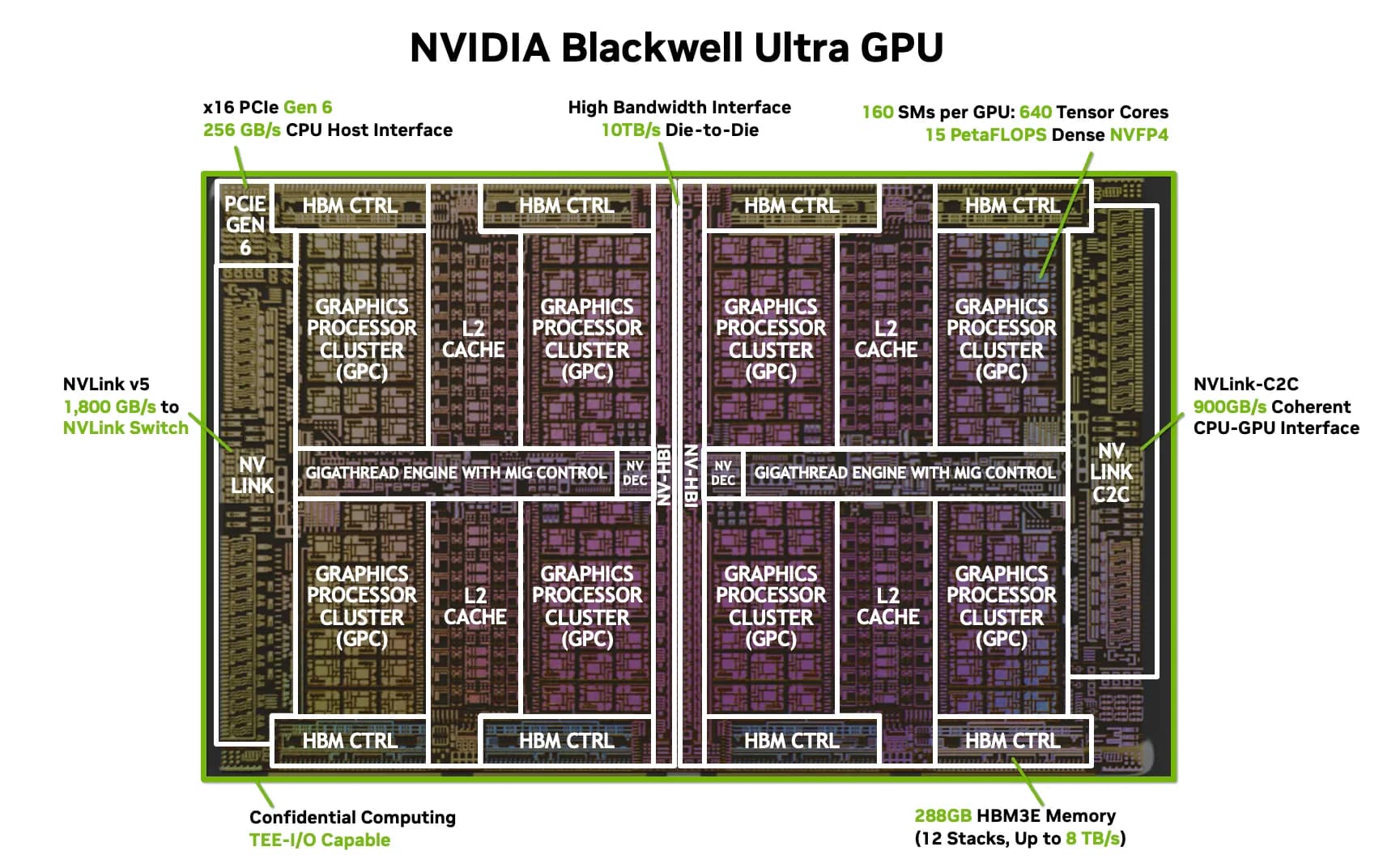
Blackwell is designed to process FP8 directly in hardware via the Transformer Engine, and the subsequent Rubin platform was announced to reduce bottlenecks in data movement by integrating a dedicated CPU (Vera) and HBM4 memory. This trend shows that designing is moving in a direction that views racks or entire data centers as a single computing system, as single-chip performance improvements alone are no longer sufficient.
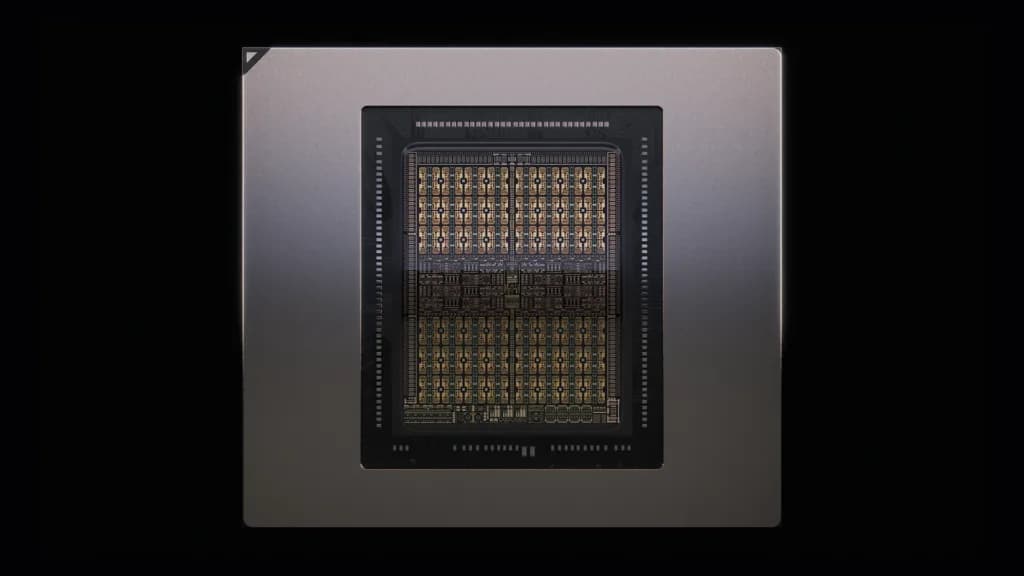
Software is also reflecting these changes. Compiler-based frameworks like JAX abstract hardware complexity while enabling lower-level control through tools like pallas and triton. In the industry, such low-level optimization is actively used to improve product performance. DeepSeek PTX Optimization Case
Deep learning frameworks are abstracted at a high level, so it is not easy to fully understand the entire execution process. However, when demanding extreme performance, it is eventually necessary to consider the operating principles and physical constraints of hardware. It is important to keep in mind that written code ultimately leads to actual operations on hardware. Only when we understand the entire process and control it appropriately can we fully unleash the potential of hardware.
Ultimately, the answer to "How do GPUs perform machine learning computations?" would be as follows:
For the question of how GPUs perform machine learning computations, the key points can be summarized as follows:
- The entire pipeline where Python code is converted to SASS machine code: Python → JAX → XLA → HLO → PTX → SASS.
- Hiding memory latency and increasing arithmetic density through Warp scheduling inside the GPU.
- Host-to-Device transfer via PCIe bus and DMA-based direct memory access.
Footnotes
- 1: Tensor: A multi-dimensional array representing input data, parameters, output data, etc., of a deep learning model. [↩︎]
- BLAS: Basic Linear Algebra Subprograms helps perform optimized operations between matrices or vectors. [↩︎]
- 2: Chain Rule: The derivative of a composition of functions is the product of the derivatives of simpler functions. [↩︎]
- 3: Activation Checkpointing: A technique to reduce memory usage by not storing activation tensors due to memory constraints, but recomputing them when needed during backpropagation. [↩︎]
- 4: AVXAdvanced Vector Extensions: An instruction set supported by Intel and AMD CPUs that provides vector operation functions capable of processing multiple data at once. [↩︎]
- 5: ICIInter-Chip Interconnect: A dedicated network interface designed for ultra-high-speed data transfer between Google TPUs, enabling 3D Torus topology configuration. [↩︎]
- 6: NPU Interconnect: NPUs often use vendor-specific proprietary interconnect technologies. For example, AWS Trainium uses NeuronLink. [↩︎]
- 7: PCIePeripheral Component Interconnect Express: A high-speed serial interface standard for connecting peripheral devices (graphics cards, SSDs, etc.) to the computer motherboard. [↩︎]
- 8: DMADirect Memory Access: A method where the hardware accesses memory directly without the CPU accessing memory. [↩︎]
- NVLink: A high-bandwidth GPU-to-GPU interconnect technology developed by NVIDIA, capable of transferring data between GPUs at speeds much faster than PCIe. [↩︎]
- InfiniBand: A high-speed network communication standard mainly used in data centers and high-performance computingHPC environments, characterized by wide bandwidth and very low latency. [↩︎]
- 9: float32, float16, etc. [↩︎]
- 10: whether it is CPU or GPU [↩︎]
- 11: Shape, Stride [↩︎]
- PTX: You can think of it as a low-level operation step that NVIDIA GPUs can execute. If CUDA is a high-level operation, PTX can be seen as a low-level operation step, which is finally converted to SASS by the GPU driver. [↩︎]
- SASS: Refers to machine code that the GPU can execute. Compiled and executed by the JIT compiler. [↩︎]
- 12: Tensor Core: A hardware block specialized for FP16/FP32 matrix operations. [↩︎]
Recommended Articles
Discrete Language Diffusion: Global Refinement on JAX/TPU
A deep dive into implementing Discrete Masked Language Diffusion using JAX and Flax NNX. We explore transition schedules, bidirectional architectures, and performance optimization for TPU v6e.
Pre-training Decoder-based Tiny LLM with JAX and TPU
We dissect the entire process from raw text data being read from disk, tokenized, and reborn as meaningful sentences through hardware called TPU. Let's implement the design of the latest Llama model directly with JAX and transform from a user of the model to a designer of the model.