Pre-training Decoder-based Tiny LLM with JAX and TPU
If you have worked with LLMs or Transformers, you have likely used AutoModel.from_pretrained. It is a Hugging Face implementation that loads a pre-trained model, but what lies behind it? This article dissects the entire process from raw text data being read from disk, tokenized, and reborn as meaningful sentences through hardware called TPU. Let's implement the design of the latest Llama model directly with JAX and move from a user of the model to a designer of the model.
The full code is open sourced. Check the repository below via the GitHub preview.
High-level libraries like HuggingFace make it easy to call and fine-tune GPT-4-class models with just a few lines of code. But convenience can hide how the system actually works. If you want to know why a model produces unexpected results, why OOMOut of Memory happens at a certain batch size, or why training loss stops decreasing, you eventually need to open the black box.
This project does not chase a grandiose SOTA model. It focuses on answering the following engineering questions from the ground up.
Framework Transition: Why do Google and DeepMind choose JAX over PyTorch? Experience the parallelization benefits of functional programming firsthand.
Modern Architecture: Compare the 2017 Transformer and 2024 Llama 3 implementations and see how RMSNorm and SwiGLU improve stability and expressiveness.
Data Engineering: How do you train text that is larger than RAM? Build a high-performance I/O pipeline using the OS virtual memory system.
2. JAX and TPU
The mainstream of deep learning frameworks is undoubtedly PyTorch and NVIDIA GPU. However, for this project, I chose JAX and Cloud TPU v6e. This is not just to "try a new tool". I wanted to solve the Von Neumann Bottleneck[1] and computational efficiency issues, which are the biggest enemies of LLM training, at a fundamental architectural level.
2.1 TPU v6e
If a GPU integrates multiple cores for graphics processing, a TPUTensor Processing Unit is an ASICApplication-Specific Integrated Circuit designed from birth solely for Matrix Multiplication, the core of deep learning. In particular, the latest TPU v6eTrillium shows a design optimized for the Transformer architecture.
Systolic Array Architecture[2]: Existing CPUs/GPUs read and write data between registers and memory for every operation. In this process, a bottleneck occurs where memory speed cannot keep up with operation speed. On the other hand, TPU directly connects thousands of arithmetic logic unitsALUs so that data flows efficiently inside the chip like blood in the heart. Since intermediate results are passed directly to the next unit without being written to memory, overwhelming throughput can be secured in large-scale matrix operations.
High Bandwidth Memory (HBM)[3]: LLM training is often determined not by operation speed but by the speed of moving data from memory. TPU v6e provides HBM bandwidth that has increased dramatically compared to the previous generation, allowing it to supply weights and data of multi-billion parameter models without delay.
Figure 1: Cloud TPU v6e Trillium(Source: Google Blog)
I've recently tested a workflow combining VSCode, Colab's TPU v6e runtime, and JAX, and the results were surprisingly excellent.
With VSCode's new Colab extension, you can run .ipynb notebooks locally in VSCode while connecting to a Colab backend. This means you can integrate tools like Codex or Antigravity directly into your notebook workflow, making the development experience much more flexible.
Colab has supported TPU v6e for about a year now, so if you have Compute Units, it's definitely worth a try. For 3 CU per hour, you get access to 32GB of HBM and about 918 TFLOPs (bf16) of peak compute capability.
I'm not sure if Colab's A100 tier is based on PCIe or SXM, but assuming the SXM version which provides about 989 TFLOPs (bf16), the cost efficiency is quite different.
The TPU v6e runtime costs about 3.37 CU per hour, while the A100 40GB runtime is about 5.37 CU per hour. Normalizing compute per cost, TPU v6e provides about 272 TFLOPs per Compute Unit, whereas the A100 only offers about 197 TFLOPs.
In other words, TPU v6e is ahead in terms of price-performance ratio.
I wanted to share this comparison as it's not often discussed. While testing a Llama 4-style decoder-only model pre-training from scratch with JAX, I confirmed that the value of v6e on Colab exceeded my expectations.
2.2 JAX
So why JAX and not PyTorch? JAX is not just a library but a combination of AutogradAutomatic Differentiation and XLAAccelerated Linear Algebra compiler. There is a reason why Google DeepMind uses JAX when developing huge models like AlphaFold or Gemini.
Extreme Optimization via XLA: PyTorchEager execution executes Python code line by line and calls GPU kernels. This is intuitive but has high overhead. On the other hand, JAX analyzes the entire computation graph through jitJust-In-Time compilation and performs Kernel Fusion[4] that combines multiple operations into a single kernel. This drastically reduces memory I/O, allowing you to maximize the performance of the TPU.
Functional Programming and Parallelization: JAX provides an API similar to numpy but aims for a pure functional paradigm that does not manage state. The initial learning curve is steep, but it has the powerful advantage of implementing multi-device distributed training with just a single line of code through transformation functions like vmap (automatic vectorization) or pmap (parallelization).
3. Environment Setup
Install jax[tpu] for TPU usage and prepare the libraries required for data processing and modeling.
Contains refined knowledge and factual information, useful for reducing hallucinations and building a knowledge base.
Table 1: Korean-language datasets used for training
4.2 No-Mix Chunking Strategy
If you simply cut the text into max_seq_len length and concatenate it, documents with different topics will be mixed in one sequenceAttention Window. For example, the end of a political news article is connected to a completely different context. The model will try to learn the relationship between these two contexts, resulting in Hallucination or poor logical consistency.
We can prevent this with the No-Mix strategy.
Include only one document in one sequence.
When the document ends, end the sequence and fill it with Padding.
This may seem like a waste of training data, but it gives more stable results in terms of model convergence speed and quality.
data_loader.py
defload_hf_text_column( dataset_name:str,*, subset:str|None=None, split:str="train", text_col:str="text", token:str|None=None, data_dir:str|None=None,)->list[str]:if token isNone: token = os.getenv("HF_TOKEN")if subset isnotNone: ds = load_dataset( dataset_name, subset, split=split, data_dir=data_dir, token=token,)else: ds = load_dataset( dataset_name, split=split, data_dir=data_dir, token=token,) texts:list[str]=[]for row in ds: text =str(row[text_col]).strip()if text: texts.append(text)return texts
defload_dialog_csv(path:str)->list[str]: df = pd.read_csv(path)if"req"notin df.columns or"res"notin df.columns:raise ValueError("CSV must contain 'req' and 'res' columns.") df = df[["req","res"]].fillna("") dialogs:list[str]=[]for req, res inzip(df["req"], df["res"]): req_str =str(req).strip() res_str =str(res).strip()ifnot req_str andnot res_str:continue text =f"{req_str}\n{res_str}\n" dialogs.append(text)return dialogs
defchunk_single_text( text:str, max_chars:int=2000, min_chars:int=200,)-> Iterator[str]: text = text.replace("\r\n","\n").strip()ifnot text:returniflen(text)<= max_chars:yield text
return lines = text.split("\n")buffer:list[str]=[] length =0for line in lines: line_text = line
whileTrue:if length ==0andlen(line_text)> max_chars: seg = line_text[:max_chars] seg = seg.strip()if seg:yield seg
line_text = line_text[max_chars:]ifnot line_text:breakcontinue piece_len =len(line_text)+(1if length >0else0)if length + piece_len > max_chars:ifbuffer: chunk ="\n".join(buffer).strip()if chunk:yield chunk
buffer=[] length =0else: seg = line_text[:max_chars] seg = seg.strip()if seg:yield seg
line_text = line_text[max_chars:]ifnot line_text:breakcontinueelse:if length ==0:buffer=[line_text] length =len(line_text)else:buffer.append(line_text) length +=len(line_text)+1breakifbuffer: chunk ="\n".join(buffer).strip()if chunk:yield chunk
defchunk_texts_no_mix( texts: Iterable[str], max_chars:int=2000, min_chars:int=200,)-> Iterator[str]:for t in texts:yieldfrom chunk_single_text(t, max_chars=max_chars, min_chars=min_chars)defwrite_corpus(chunks: Iterable[str], path:str)->None:withopen(path,"w", encoding="utf-8")as f:for text in chunks: normalized = text.replace("\r\n","\n").strip()ifnot normalized:continue f.write(normalized +"\n\n")webtext = load_hf_text_column("HAERAE-HUB/KOREAN-WEBTEXT-1B", split="train", text_col="text",)synthetictext = load_hf_text_column("HAERAE-HUB/KOREAN-SyntheticText-1.5B", split="train", text_col="text",)wikitext = load_hf_text_column("wikimedia/wikipedia", subset="20231101.ko", split="train", text_col="text",)all_texts:list[str]=[]all_texts.extend(webtext)# all_texts.extend(synthetictext)# all_texts.extend(wikitext)# Considering training time, we will use only webtext for now.# If it works as intended, you can add other data like synthetictext or wikitext.# The data used here is rich in semantic information, trained with wiki content, etc., and shuffled.rng = np.random.default_rng(seed=0)perm = rng.permutation(len(all_texts))shuffled_texts =[all_texts[i]for i in perm]corpus_chunks:list[str]=list( chunk_texts_no_mix( shuffled_texts, max_chars=2000, min_chars=200,))write_corpus(corpus_chunks,"corpus.txt")print(len(corpus_chunks), corpus_chunks[0][:200])
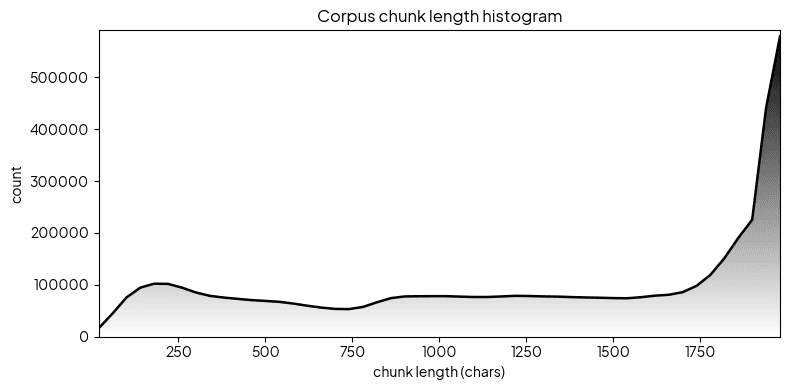
4.3 Data Distribution Check
Figure 2: Corpus chunk length histogram
analysis.py
lengths = np.fromiter((len(s)for s in corpus_chunks), dtype=np.int32)print("num chunks:",len(lengths))print("min len :", lengths.min())print("max len :", lengths.max())print("mean len :", lengths.mean())plt.figure(figsize=(8,4))plt.hist(lengths, bins=50)plt.xlabel("chunk length (chars)")plt.ylabel("count")plt.title("Corpus chunk length histogram")plt.grid(True)plt.show()
tokenizer.py
classSentencePieceTokenizer:def__init__(self, cfg: TokenizerConfig): self.cfg = cfg
self.sp =None@propertydefpad_id(self)->int:return self.cfg.pad_id
@propertydefbos_id(self)->int:return self.cfg.bos_id
@propertydefeos_id(self)->int:return self.cfg.eos_id
@propertydefunk_id(self)->int:return self.cfg.unk_id
@propertydefvocab_size(self)->int:if self.sp isNone:return0returnint(self.sp.GetPieceSize())deftrain(self, corpus_path:str)->None: spm.SentencePieceTrainer.Train(input=corpus_path, model_prefix=self.cfg.model_prefix, vocab_size=self.cfg.vocab_size, model_type=self.cfg.model_type, character_coverage=self.cfg.character_coverage, input_sentence_size=self.cfg.input_sentence_size, shuffle_input_sentence=self.cfg.shuffle_input_sentence, train_extremely_large_corpus=self.cfg.train_extremely_large_corpus, pad_id=self.cfg.pad_id, bos_id=self.cfg.bos_id, eos_id=self.cfg.eos_id, unk_id=self.cfg.unk_id, pad_piece="<pad>", bos_piece="<bos>", eos_piece="<eos>", unk_piece="<unk>",) self.sp = spm.SentencePieceProcessor() self.sp.Load(f"{self.cfg.model_prefix}.model")defload(self)->None: self.sp = spm.SentencePieceProcessor() self.sp.Load(f"{self.cfg.model_prefix}.model")defencode(self, text:str, add_special:bool=True)->list[int]:if self.sp isNone:raise RuntimeError("SentencePiece model is not loaded.") ids =list(self.sp.EncodeAsIds(text))if add_special:return[self.bos_id]+ ids +[self.eos_id]return ids
defencode_fixed(self, text:str, seq_len:int)->list[int]: ids = self.encode(text, add_special=True)iflen(ids)>= seq_len:return ids[:seq_len] pad_len = seq_len -len(ids)return ids +[self.pad_id]* pad_len
defdecode(self, ids: Iterable[int], skip_special:bool=True)->str:if self.sp isNone:raise RuntimeError("SentencePiece model is not loaded.") filtered:list[int]=[]for i in ids:if skip_special and i in(self.pad_id, self.bos_id, self.eos_id):continue filtered.append(int(i))return self.sp.DecodeIds(filtered)defiter_corpus(paths:list[str])-> Iterator[str]:for path in paths:withopen(path,"r", encoding="utf-8")as f:for line in f: text = line.strip()if text:yield text
defcount_samples(paths:list[str])->int:returnsum(1for _ in iter_corpus(paths))defencode_and_save_memmap_streaming( paths:list[str], tokenizer: SentencePieceTokenizer, seq_len:int, out_path:str,)->tuple[np.memmap,int]: n_samples = count_samples(paths) arr = np.memmap(out_path, mode="w+", dtype=np.int32, shape=(n_samples, seq_len)) i =0for text in iter_corpus(paths): ids = tokenizer.encode_fixed(text, seq_len) arr[i,:]= np.asarray(ids, dtype=np.int32)if(i +1)%10000==0:print(f"encoded {i +1}/{n_samples}") i +=1 arr.flush()return arr, n_samples
tokenizer = SentencePieceTokenizer(cfg=tok_cfg)tokenizer.train("corpus.txt")seq_len = model_cfg.max_seq_len
corpus_paths =["corpus.txt"]encoded_mm, n_samples = encode_and_save_memmap_streaming( corpus_paths, tokenizer, seq_len, out_path="encoded_int32.dat",)vocab_size = tokenizer.vocab_size
print(f"n_samples={n_samples}, vocab_size={vocab_size}")
5. Model Architecture
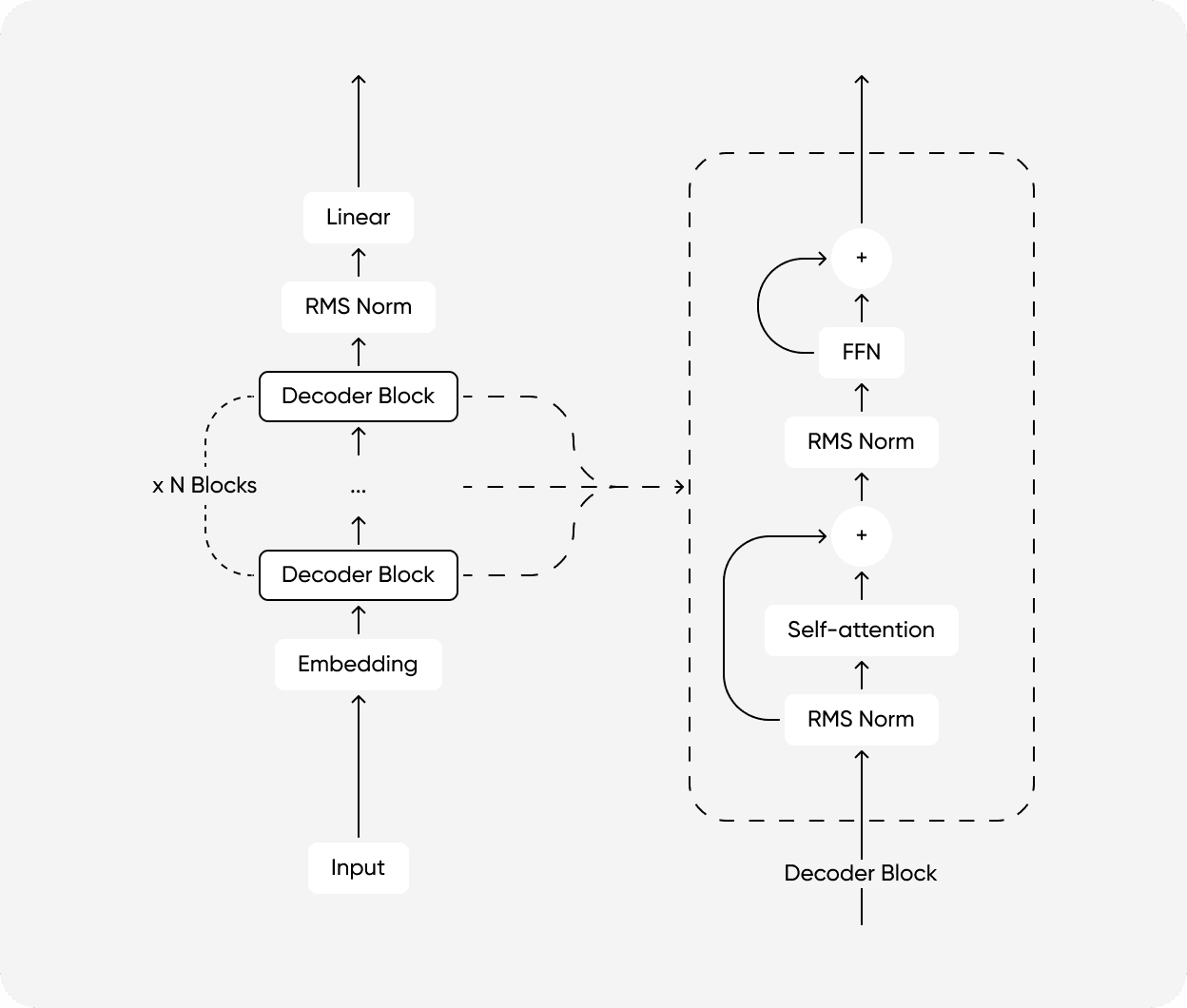
We configured it by referring to the Llama architecture, an open LLM released by Meta, rather than the 2017 Attention Is All You Need paper.
Pre-training is the process by which a model acquires the statistical structure and knowledge of language through the Next Token Prediction task. In this process, the model learns the probability distribution of the words that follow based on the input context.
Existing LayerNorm normalizes by calculating both mean and variance. However, recent studies have revealed that the core of normalization lies in Scaling, not Centering. Reference Link
RMSNormRoot Mean Square Normalization improves computational efficiency by removing the mean calculation.
aˉ∗i=RMS(a)a_ig_i,whereRMS(a)=n1∑∗i=1na_i2
In JAX implementation, rsqrtReciprocal Square Root can be used to replace division with multiplication, further optimizing speed.
5.2 Decoder-only Self-Attention and Causal Masking
The core of the Decoder-only Transformer is Self-Attention and Causal Masking.
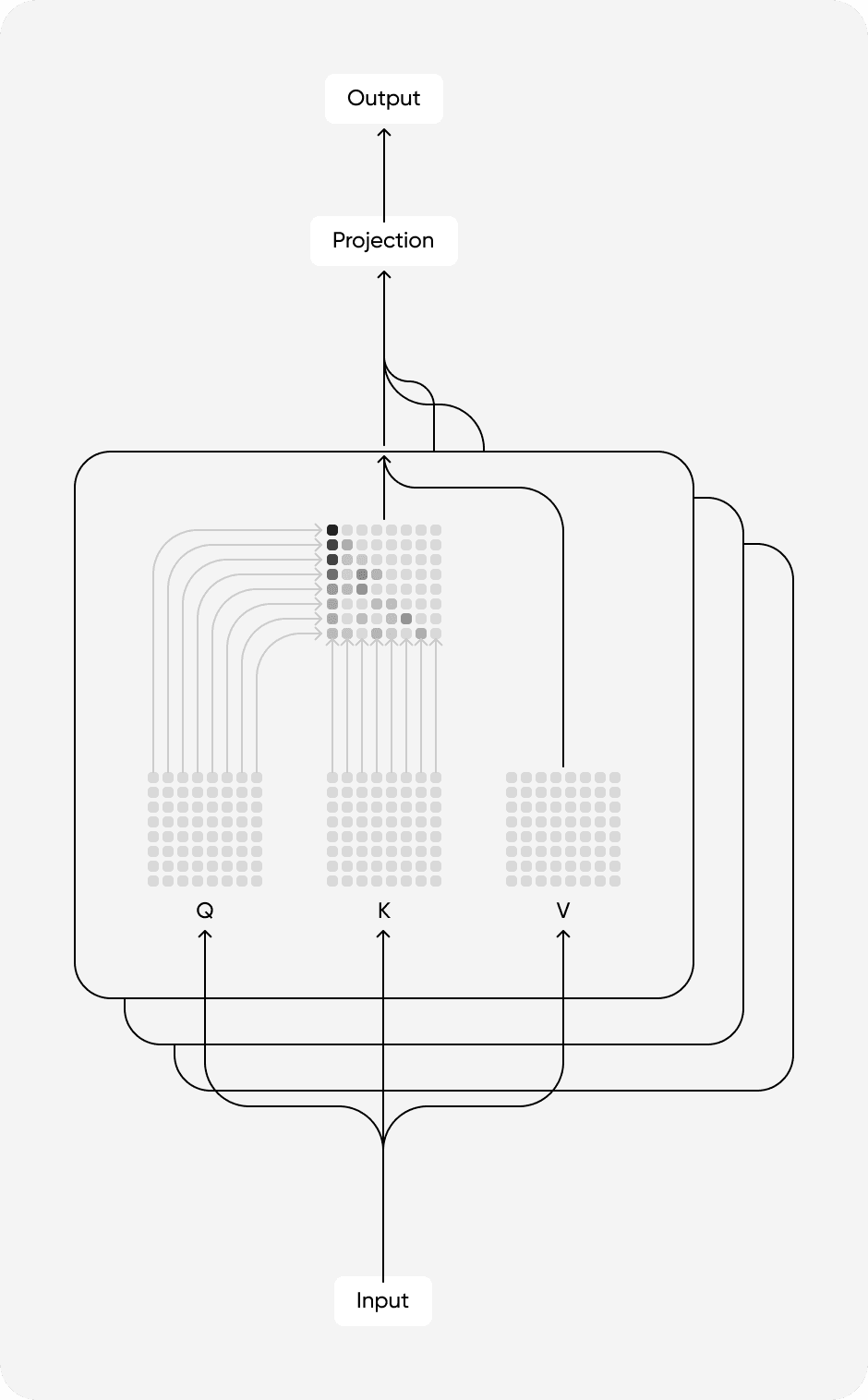
Self-Attention: All tokens in the sequence refer to each otherQuery-Key dot product to calculate contextual relevance. This allows tracking the target of pronouns or referents and calculating the meaning of the entire sentence.
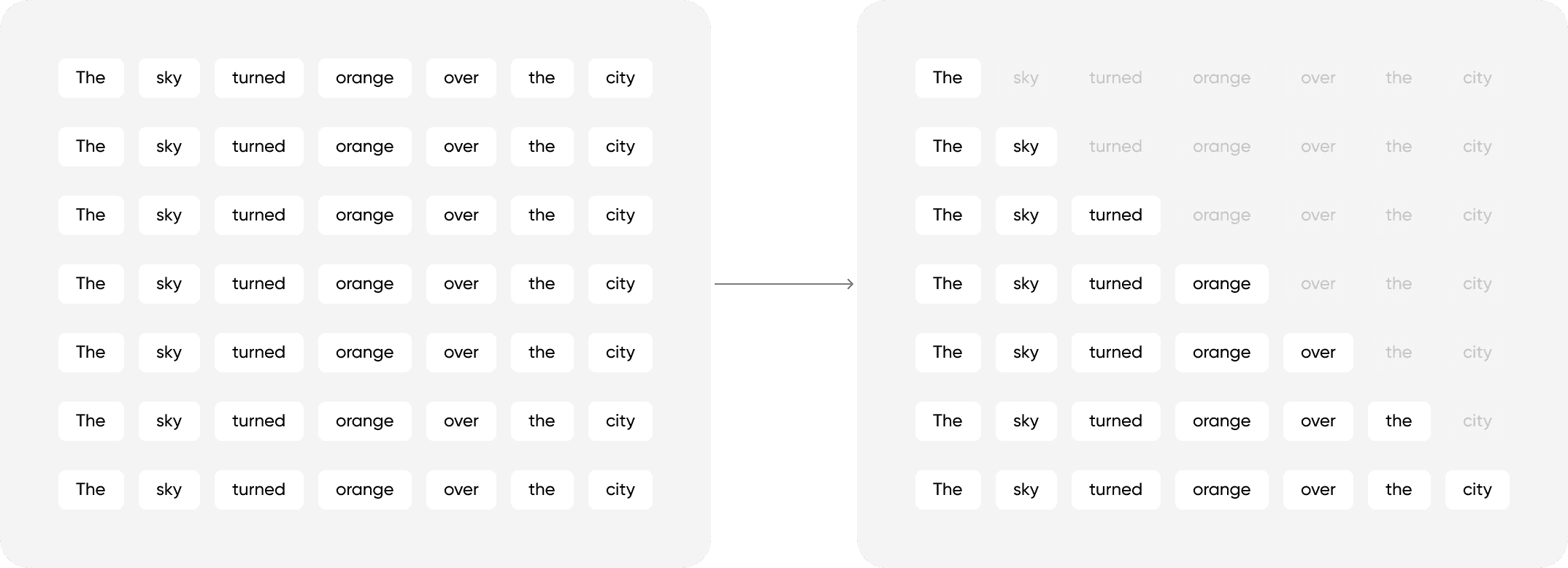
Causal Masking: Used to prevent the model from peeking at the future answerNext Token during training. By masking the Upper Triangular part of the T×T attention matrix, it forces the model to see only tokens before t at the current time t.
Figure 4: Scaled Dot Product Attention mechanism
Especially in the Decoder-only structure, Masked Multi-Head Attention is essential. As shown in the figure below, if the upper part of the matrix diagonal (future time) is masked with −∞, the probability becomes 0 after passing through Softmax, blocking information. This trains the model to predict the next word based only on past information.
Figure 5: Triangular matrix for causal masking
model.py
classMultiHeadSelfAttention(nn.Module): d_model:int n_heads:intdefsetup(self)->None: self.qkv_proj = nn.Dense(3* self.d_model, use_bias=False) self.out_proj = nn.Dense(self.d_model, use_bias=False)def__call__(self, x: jnp.ndarray)-> jnp.ndarray: b, t, d = x.shape
h = self.n_heads
d_head = d // h
qkv = self.qkv_proj(x) q, k, v = jnp.split(qkv,3, axis=-1) q = q.reshape(b, t, h, d_head) k = k.reshape(b, t, h, d_head) v = v.reshape(b, t, h, d_head) attn_logits = jnp.einsum("bthd,bThd->bhtT", q, k)/ jnp.sqrt(jnp.float32(d_head)) mask = jnp.tril(jnp.ones((t, t), dtype=jnp.bool_)) mask = jnp.reshape(mask,(1,1, t, t)) attn_logits = jnp.where(mask, attn_logits,-1e9) attn = nn.softmax(attn_logits, axis=-1) out = jnp.einsum("bhtT,bThd->bthd", attn, v) out = out.reshape(b, t, d) out = self.out_proj(out)return out
defdecode( self, x: jnp.ndarray,*, cache:dict[str, jnp.ndarray], cache_index: jnp.ndarray,)->tuple[jnp.ndarray,dict[str, jnp.ndarray]]: b, t, d = x.shape
h = self.n_heads
d_head = d // h
qkv = self.qkv_proj(x) q, k, v = jnp.split(qkv,3, axis=-1) q = q.reshape(b, t, h, d_head) k = k.reshape(b, t, h, d_head) v = v.reshape(b, t, h, d_head) k_cache = cache["k"] v_cache = cache["v"] k_cache = jax.lax.dynamic_update_slice(k_cache, k,(0, cache_index,0,0)) v_cache = jax.lax.dynamic_update_slice(v_cache, v,(0, cache_index,0,0)) total_len = cache_index + t
k_used = k_cache[:,:total_len,:,:] v_used = v_cache[:,:total_len,:,:] attn_logits = jnp.einsum("bthd,bThd->bhtT", q, k_used)/ jnp.sqrt(jnp.float32(d_head)) attn = nn.softmax(attn_logits, axis=-1) out = jnp.einsum("bhtT,bThd->bthd", attn, v_used) out = out.reshape(b, t, d) out = self.out_proj(out) new_cache ={"k": k_cache,"v": v_cache}return out, new_cache
5.3 SwiGLU
Llama introduced SwiGLUSiLU Gated Linear Unit to the FFNFeed Forward Network. This is not just a simple activation functionReLU, but acts as a Gate[5] that controls the flow of information. Reference Link
SwiGLU(x)=(SiLU(xW_G)⊙xW_Up)W_Down
If the value of the gate path (xW_G) is small, it blocks information (xW_Up), and if it is large, it passes it. This gives the model the ability to learn what information to remember and what to forget.
model.py
classFeedForward(nn.Module): d_model:int d_ff:intdefsetup(self)->None: self.gate = nn.Dense(self.d_ff) self.up = nn.Dense(self.d_ff) self.down = nn.Dense(self.d_model)def__call__(self, x: jnp.ndarray)-> jnp.ndarray: gate = self.gate(x) up = self.up(x) x = nn.silu(gate)* up
x = self.down(x)return x
5.4 Block Assembly
Finally, assemble these parts. It is important to use the Pre-Norm structure (Norm → Attention → Add). This prevents gradient vanishing in deep neural networks and dramatically improves training stability in the early stages.
model.py
classDecoderBlock(nn.Module): d_model:int n_heads:int d_ff:intdefsetup(self)->None: self.norm1 = RMSNorm() self.norm2 = RMSNorm() self.attn = MultiHeadSelfAttention(self.d_model, self.n_heads) self.ff = FeedForward(self.d_model, self.d_ff)def__call__(self, x: jnp.ndarray)-> jnp.ndarray: h = self.norm1(x) h = self.attn(h) x = x + h
h = self.norm2(x) h = self.ff(h) x = x + h
return x
defdecode( self, x: jnp.ndarray,*, cache:dict[str, jnp.ndarray], cache_index: jnp.ndarray,)->tuple[jnp.ndarray,dict[str, jnp.ndarray]]: h = self.norm1(x) h, new_cache = self.attn.decode(h, cache=cache, cache_index=cache_index) x = x + h
h = self.norm2(x) h = self.ff(h) x = x + h
return x, new_cache
classDecoderTransformer(nn.Module): vocab_size:int d_model:int n_heads:int d_ff:int n_layers:int max_seq_len:intdefsetup(self)->None: self.tok_embed = nn.Embed(num_embeddings=self.vocab_size, features=self.d_model) self.pos_embed = nn.Embed(num_embeddings=self.max_seq_len, features=self.d_model) self.blocks =[ DecoderBlock(self.d_model, self.n_heads, self.d_ff)for _ inrange(self.n_layers)] self.norm = RMSNorm() self.head = nn.Dense(self.vocab_size)def__call__(self, x: jnp.ndarray)-> jnp.ndarray: _, t = x.shape
pos = jnp.arange(t)[None,:] h = self.tok_embed(x)+ self.pos_embed(pos)for blk in self.blocks: h = blk(h) h = self.norm(h) logits = self.head(h)return logits
defdecode( self, x: jnp.ndarray,*, cache:list[dict[str, jnp.ndarray]], cache_index: jnp.ndarray,)->tuple[jnp.ndarray,list[dict[str, jnp.ndarray]]]: _, t = x.shape
pos =(cache_index + jnp.arange(t))[None,:] h = self.tok_embed(x)+ self.pos_embed(pos) new_caches:list[dict[str, jnp.ndarray]]=[]for i, blk inenumerate(self.blocks): h, layer_cache = blk.decode(h, cache=cache[i], cache_index=cache_index) new_caches.append(layer_cache) h = self.norm(h) logits = self.head(h)return logits, new_caches
definit_cache(self, batch_size:int)->list[dict[str, jnp.ndarray]]: d_head = self.d_model // self.n_heads
k = jnp.zeros((batch_size, self.max_seq_len, self.n_heads, d_head), dtype=jnp.float32) v = jnp.zeros_like(k)return[{"k": k,"v": v}for _ inrange(self.n_layers)]
6. Training
@jax.jit is the core of JAX training. The first call to train_step is traced into an XLA graph and compiled to TPU instructions. Operations are fused, eliminating memory bottlenecks.
Recomputing the whole sequence for each new token is O(N2) and inefficient. KV Cache stores previous Keys/Values so you can reuse them, reducing complexity to O(N).
During generation, tokens are produced one by one. When generating the 100th token, Keys/Values for the first 99 tokens are already cached in GPU/TPU memory. Only the new Query interacts with those cached values, keeping computation linear even for long sequences. In JAX, jax.lax.dynamic_update_slice efficiently updates this cache.
generate.py
from functools import partial
@partial(jax.jit, static_argnums=0)defdecode_step( model: DecoderTransformer, params, x: jnp.ndarray, cache:list[dict[str, jnp.ndarray]], cache_index: jnp.ndarray,)->tuple[jnp.ndarray,list[dict[str, jnp.ndarray]]]: logits, new_cache = model.apply( params, x, cache=cache, cache_index=cache_index, method=DecoderTransformer.decode,)return logits, new_cache
defencode_prompt(text:str)->list[int]: base_ids = tokenizer.encode(text, add_special=False)return[tokenizer.bos_id]+ base_ids
defgenerate(prompt:str, max_new_tokens:int=128)->str: ids:list[int]= encode_prompt(prompt)ifnot ids: ids =[tokenizer.bos_id] batch_size =1 cache = model.init_cache(batch_size) cache_index =0for tok in ids: x = jnp.array([[tok]], dtype=jnp.int32) logits, cache = decode_step( model, state.params, x, cache, jnp.array(cache_index, dtype=jnp.int32),) cache_index +=1if cache_index >= model.max_seq_len:breakfor _ inrange(max_new_tokens): next_id =int(jnp.argmax(logits[0,-1])) ids.append(next_id)if next_id == tokenizer.eos_id or cache_index >= model.max_seq_len:break x = jnp.array([[next_id]], dtype=jnp.int32) logits, cache = decode_step( model, state.params, x, cache, jnp.array(cache_index, dtype=jnp.int32),) cache_index +=1return tokenizer.decode(ids)print(generate("Do you have a favorite type of tea?"))
Even though this is a tiny model[6], it follows Korean grammar and simple dialogue context convincingly.
8. Conclusion
We rebuilt the full LLM training pipeline with JAX and TPU from an engineering perspective.
Utility of JAX and XLA: Compared to PyTorch Eager, XLA compilation with Kernel Fusion improved device utilization (MFU) for bandwidth-bound LLM training.
Benefits of Modern Architecture: RMSNorm simplifies computation and SwiGLU's gating curbs early divergence while helping convergence.
System-level Optimization: Instead of loading all text into memory, leveraging the OS Page Cache and Memmap minimized I/O bottlenecks.
This Tiny LLM implementation is a solid foundation for understanding large-model internals and experimenting with new architectures.
Footnotes
1: Von Neumann Bottleneck: System performance is limited when CPU-to-memory bandwidth cannot keep up with computation speed. [↩︎]
2: Systolic Array: Data flows through an array of processing elementsPEs and is computed continuously, like blood pumped systolically. [↩︎]
3: HBMHigh Bandwidth Memory: High-performance memory that boosts bandwidth via 3D stacking. [↩︎]
4: Kernel Fusion: Optimization that merges several GPU/TPU kernels to cut memory traffic. [↩︎]
5: Gate: A path learned to pass only useful information and suppress unnecessary values by multiplying element-wise weights for each input. [↩︎]
6: tiny: Refers to experimental models in the tens-of-millions to ~100M parameter range, used for architecture validation and pipeline checks. [↩︎]