
Deploying BERT on Vertex AI
As machine learning engineers, we often come across the need to deploy custom models on cloud platforms for scalability and production usage. However, while there are many guides on using pre-built models with Vertex AI, resources on deploying fully custom-trained models are somewhat lacking.
This motivated me to put together a fully working, end-to-end Colab notebook that demonstrates how to train, fine-tune, and deploy a custom BERT-based text classification model on Google Cloud Vertex AI. This guide will walk through all the necessary steps — from setting up your environment to running real-time predictions via a deployed endpoint.
By the end of this tutorial, you’ll have a deep understanding of:
- Deploying a trained model to Google Cloud Vertex AI:The complete process from custom model packaging using TorchServe and MAR files to endpoint deployment.
- Setting up an inference endpoint for real-time predictions:Endpoint provisioning using gcloud CLI and Python SDK, and testing prediction requests.
- Training a PyTorch-based BERT model for text classification:Model fine-tuning using the Transformers library and dataset preprocessing.
- ML Engineering Basics (Training, Evaluation, Archiving):Engineering practices for model artifact management and deployment preparation beyond experiment tracking.
Let’s dive in!
Vertex AI Colab Code:
Google Colab
Preview unavailable.

Wait, what is Vertex AI?
Vertex AI is Google Cloud’s unified machine learning platform that provides end-to-end solutions for training, deploying, and managing ML models at scale. It consolidates tools like AutoML, custom model training, and MLOps into a single environment, making it easier to develop, deploy, and monitor ML applications.
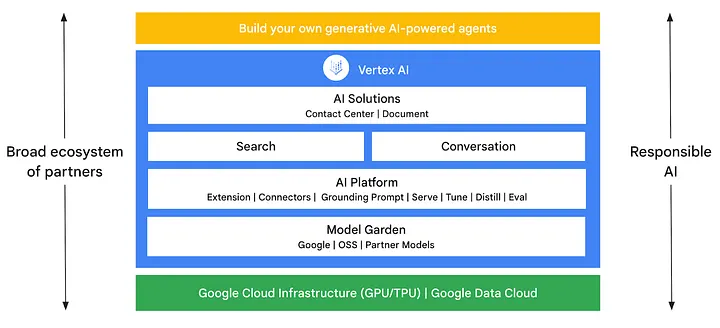
Types of Vertex AI Services
Vertex AI offers a range of services tailored for different ML needs:
- Vertex AI Training: Supports custom training jobs and AutoML[1] for model development.
- Vertex AI Prediction: Enables deploying trained models as endpoints for online or batch inference.
- Vertex AI Pipelines: Provides workflow automation for end-to-end ML model lifecycle management.
- Vertex AI Feature Store: Centralized repository for storing, serving, and sharing ML features.
- Vertex AI Workbench: A managed Jupyter-based environment for model experimentation.
- Vertex AI Model Monitoring: Tools for tracking model performance and detecting drift in production.
In this article, we will focus specifically on Vertex AI Prediction, which enables deploying trained models as endpoints for online or batch inference. This will allow us to serve real-time predictions through a managed cloud-based API.
Step 1: Setting Up the Environment
Before we start training and deploying our model, we need to set up Google Cloud authentication. If you haven’t already created a Google Cloud Service Account, follow these steps:
- Open the Google Cloud Console.
- Navigate to IAM & Admin > Service Accounts.
- Click + CREATE SERVICE ACCOUNT.
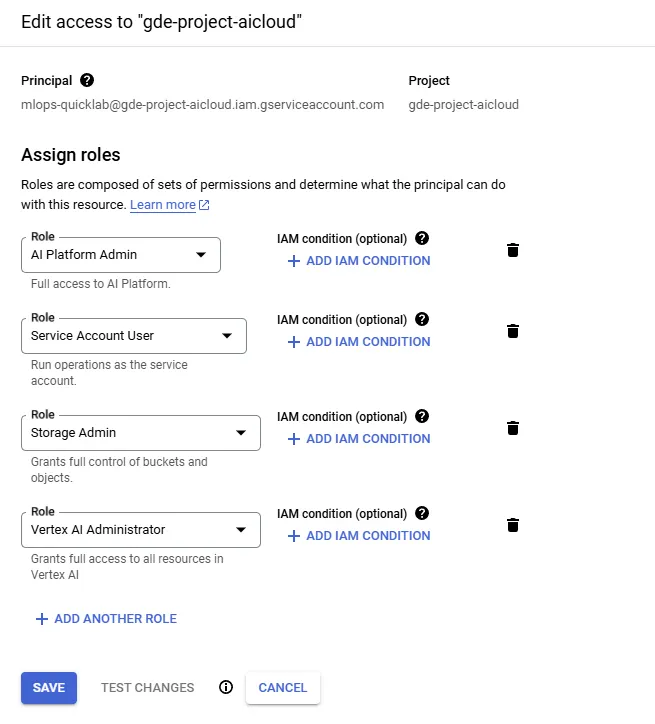
- Give your service account a name and assign it the following roles:
⚠ Note: In this article, Admin privileges were provided in a simplified form for examples. However, in a company cloud account or a real environment, you should grant permissions with a fine-grained approach, restricting the scope accordingly.
- Storage Admin: Manage Cloud Storage buckets & files.
- AI Platform Admin: Full access to AI models and training.
- Service Account User: Enable acting as a service account.
- Vertex AI Admin: Full control over Vertex AI services.
- Go to the newly created service account and navigate to the Keys tab.
- Click Add Key > Create new key > JSON.
- Download the JSON key file and save it as
credentials.json.
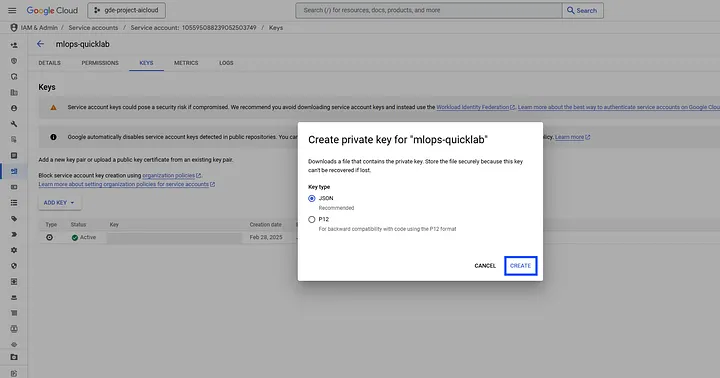
The Google Cloud console prompt above shows where you download the service-account credential as a JSON file.
Now, we can use credentials.json on Colab or your local environment.
Step 2: Preparing the Dataset and Model
We’ll use the AG News dataset to train a BERT-based classifier:
- AG News Dataset: Contains short text samples labeled by topic (e.g., World, Sports, Business, Sci/Tech).
- BERT: A pre-trained language model from the
transformerslibrary[2].
After tokenization and formatting, we create DataLoaders.
Once the data preparation is complete, we will train the model for three epochs. Using a T4 GPU, the training can be completed in about 5 minutes.
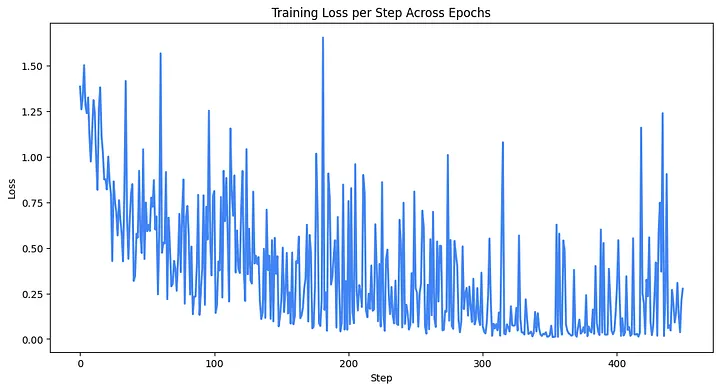
The chart above visualizes the training loss recorded at each step over the three epochs.
We trained a BERT model for a simple NLP classification task. Despite the short training time, we can see that the loss is converging.
To more explicitly evaluate the performance of the classification task, it is best to use a Confusion Matrix.
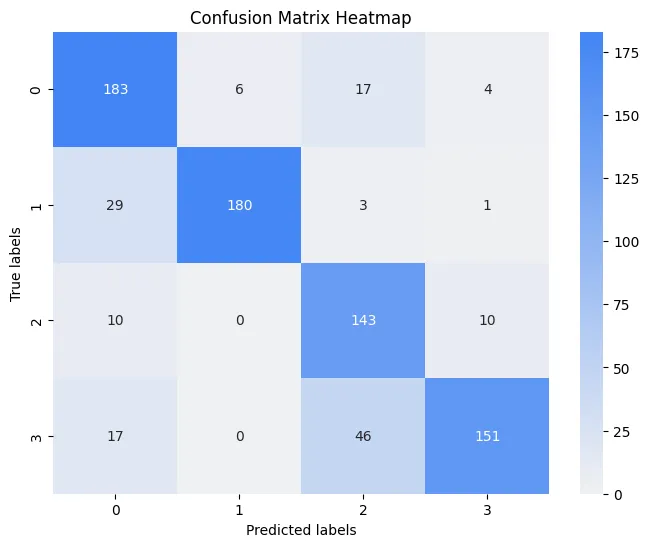
This Confusion Matrix highlights how each class performs via the model’s predictions.
Looking at the results above, we can see that label 3 (Sci/Tech) is often confused with label 2 (Business). This can be intuitively interpreted as a result of technology topics frequently appearing in business news.
Step 3: Deploying the Model to Vertex AI
Once training is complete, we upload our model to Google Cloud Storage and deploy it to Vertex AI.
TorchServe and MAR Files
TorchServe[3] is an open-source framework for serving PyTorch models. It allows you to package your model into a single MARModel Archive[4] file that includes weights, configurations, and custom code.
After training, we create the MAR file using the Torch Model Archiver CLI:
Uploading to GCS and Deploying
We upload our bert_model.mar file to a Google Cloud Storage bucket.
Finally, we register and deploy the model on Vertex AI.
⚠ Note: Deployment can take 15–30 minutes.
Step 4: Running Inference
After successful deployment, test inference by sending a prediction request.

The screenshot above captures the final Colab output showing the deployed endpoint’s inference response.
Step 5: Cleaning Up Resources
To avoid unintended costs, make sure to undeploy and delete resources after testing.
Wrapping Up
The core of this project lies not just in deploying a model to the cloud, but in building a deployment pipeline that decouples 'model logic' from 'infrastructure'. While one could write a serving server directly using Flask or FastAPI, this often results in model code being tightly coupled with web server logic.
In contrast, we standardized the model interface using TorchServe and the MARModel Archive format. Thanks to this, the model can be deployed in the same way not only on Vertex AI but also on KServe, AWS SageMaker, or even a local Kubernetes cluster.
Vertex AI is simply a stable container runtime that accepts and executes these standardized artifacts. Ultimately, what matters is not the features of a specific cloud vendor, but designing a deployment architecture that is reproducible and scalable in any environment. I hope this tutorial serves as a meaningful reference for engineers thinking about sustainable MLOps pipelines beyond simple deployment exercises.
Footnotes
- 1: Automated Machine Learning, technology that automates everything from data preprocessing to model training and tuning [↩︎]
- 2: Bidirectional Encoder Representations from Transformers, a natural language processing model developed by Google [↩︎]
- 3: High-performance model serving library for PyTorch models [↩︎]
- 4: Model packaging format used by TorchServe [↩︎]
Recommended Articles
Antigravity Agent Architecture and Evaluation Loop Design
An Antigravity agent architecture that separates evaluation evidence, local revision, validation, and save authority.
Discrete Language Diffusion: Global Refinement on JAX/TPU
A deep dive into implementing Discrete Masked Language Diffusion using JAX and Flax NNX. We explore transition schedules, bidirectional architectures, and performance optimization for TPU v6e.