
Edge Serving and Performance Analysis of Gemma 3 on Mobile with Flutter
Large Language ModelsLLMs are increasingly establishing themselves deeply in our digital daily lives, yet the necessity of cloud dependence remains a major hurdle to utilization. To properly utilize AI on the go, it must work anytime, anywhere, without relying on a stable internet connection.
This is the exact problem Google’s new Gemma 3 family of models was designed to solve. Gemma 3 is worth noting in that it brings the multimodal performance of Frontier-class models[1] to a level that can be loaded onto mobile and portable devices. This article was written to share the insights and results gained from the process of running Gemma 3 on a mobile device. We will walk through the step-by-step process of building a Flutter chat app that runs a 1B parameter Gemma 3 model on an iPhone, sharing the technical challenges and solutions encountered during implementation.
The full source code is available on the GitHub repository below:
KennethanCeyer/gemma3-chat-app
A sample Flutter application for Gemma3 Edge-serving
TL;DR
- Gemma 3 Mobile Support: You can run the Gemma 3 (1B) model on-device on iOS using Flutter and the MediaPipe GenAI package.
- Still Experimental: You need to use Flutter's master channel to enable the experimental
native-assetsfeature for building. - Dependency Linking Required: The standard build process does not automatically handle native MediaPipe dependencies (
MediaPipeTasksGenAI,MediaPipeTasksGenAIC), so a manually createdPodfileis currently required to link them correctly. - Model Loading Required: For native code to access the model, it must be copied from Flutter's assets to the app's local device storage on first launch.
Why Use Gemma 3 On-Device?
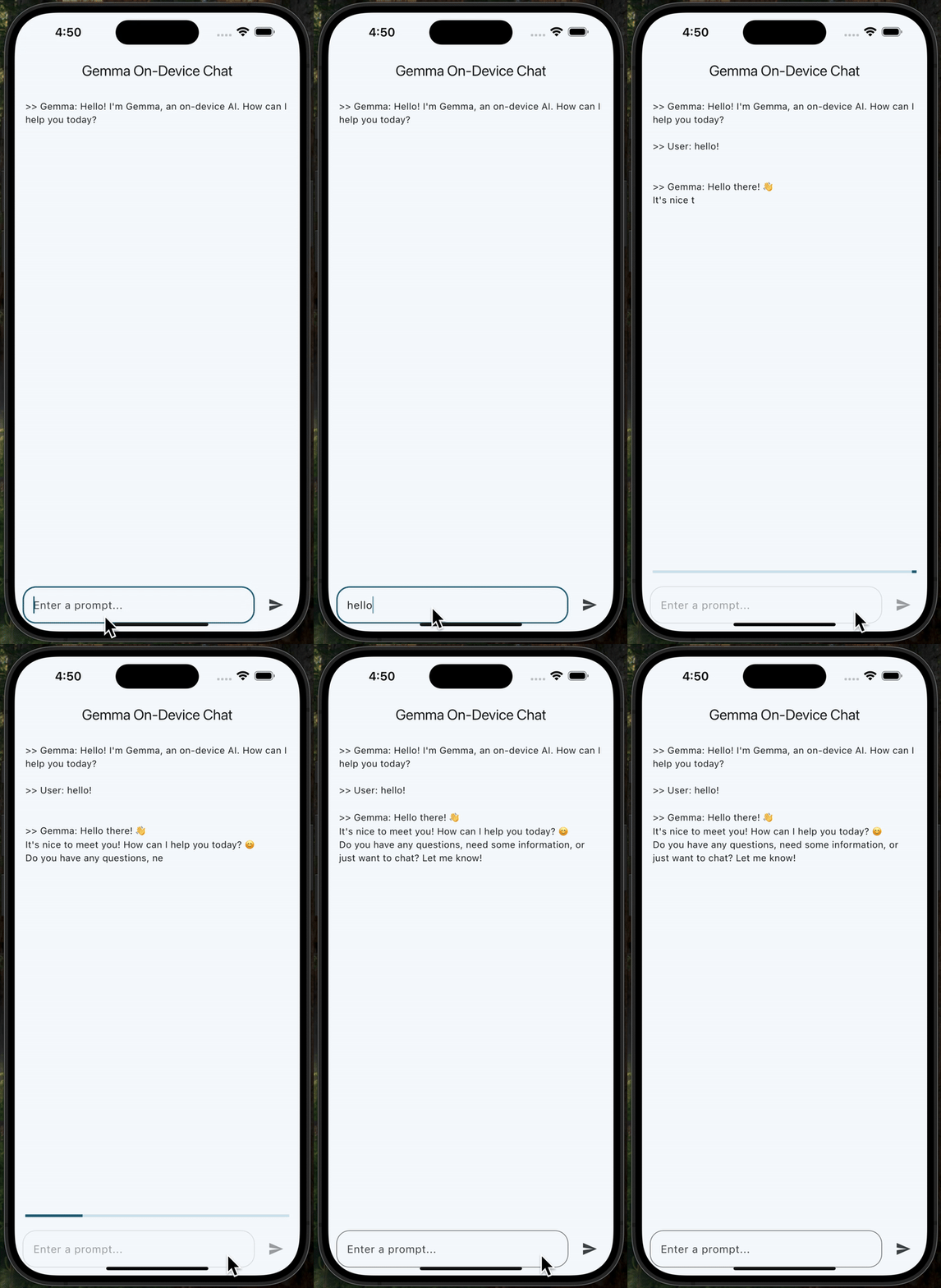
The reason for choosing Gemma 3 for this edge serving process was as follows:
- It is Google's open weights model[2], based on the same research as the Gemini models, but specifically designed for efficiency on edge devices. Its architecture is designed so that the latest AI technology trapped in data centers can be run directly in the user's hands.
- Availability of optimized variants is critical. We used the
gemma-3-1b-it-int4.taskmodel. This "1B"[3] model is a lightweight variant, and Quantization[4] is applied. This process reduces the model's file size and memoryRAM usage, which is a necessary trade-off for running smoothly on a mobile phone. - The
.taskformat itself provides great convenience. It is a MediaPipe model bundle that packages the core TensorFlow Lite[5] model, tokenizer, and other metadata into a single file, simplifying the deployment process.
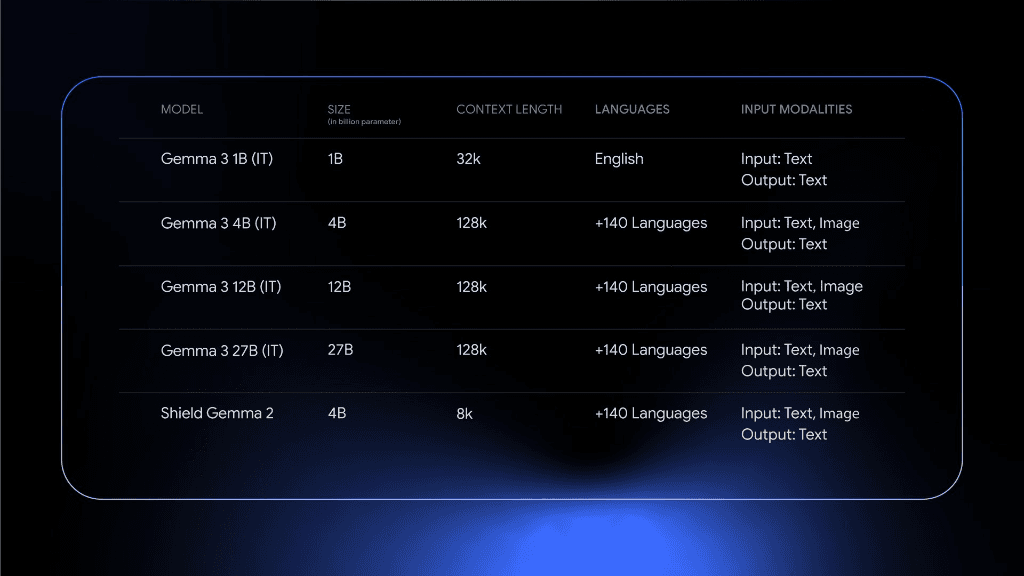
Gemma 3 provides models of various sizes, such as 1B, 4B, 12B, and 27B, allowing selection according to usage purpose and environment. While models of 4B and above support multimodal inputs, the 1B model is designed exclusively for text, maximizing efficiency on mobile devices. In this project, we used the Gemma 3 1B IT[6] version optimized for the mobile environment.
Benchmarks
The following are the key benchmark performances of the Gemma 3 1B model. Compared to lightweight models released around the same time, it shows decent performance, especially in the area of common sense reasoning.
| Benchmark | Metric | Gemma 3 PT 1B | Remarks |
|---|---|---|---|
| HellaSwag | 10-shot | 62.3 | Common Sense Reasoning[7] |
| BoolQ | 0-shot | 63.2 | Yes/No Q&A[8] |
| PIQA | 0-shot | 73.8 | Physical Common Sense[9] |
| SocialIQA | 0-shot | 48.9 | Social Common Sense[10] |
| TriviaQA | 5-shot | 39.8 | General Common Sense[11] |
| Natural Questions | 5-shot | 9.48 | Q&A[12] |
| ARC-c | 25-shot | 38.4 | Scientific Reasoning (Challenge)[13] |
| ARC-e | 0-shot | 73.0 | Scientific Reasoning (Easy)[14] |
| WinoGrande | 5-shot | 58.2 | Common Sense Reasoning (Pronouns)[15] |
| BIG-Bench Hard | few-shot | 28.4 | Comprehensive Hard Tasks[16] |
| DROP | 1-shot | 42.4 | Reading Comprehension & Arithmetic[17] |
When compared with competing models like Llama 3.2 1B released around the same time, Gemma 3 1B shows strength in PIQA (Physical Common Sense) and ARC-e (Foundation Science). In particular, despite being a 1 Billion parameter size capable of running on mobile devices, it supports a 32K context window[18], giving it an advantage in tasks requiring understanding of long contexts.
Model Architecture
| Parameter | Value |
|---|---|
| Embedding Size ()[19] | 1,152 |
| Layers[20] | 26 |
| Feedforward Hidden Dims | 13,824 |
| Num Heads[21] | 4 |
| Num Key Value Heads[22] | 1 |
| Query Key Value Head Size | 256 |
| Vocab Size (SentencePiece)[23] | 262,144 |
| Context Window | 32k |
This 1B model features 26 layers and an embedding size of 1,152, enabling deep language understanding even in a mobile environment. In particular, the 32k context window provides a significant advantage in processing long conversations or documents, and the massive vocabulary of over 260,000 supports multilingual processing capabilities. The structure using 4 heads and 1 KV head contributes to fast inference speeds by efficiently using memory bandwidth.
Why Use Flutter for Cross-Platform AI Apps?

After selecting the model, the next decision was the application framework. Flutter was a suitable choice for this project for two main reasons.
- High-Quality Native Experience: Flutter allows building high-performance, native-compiled applications for both iOS and Android with a single codebase. This means the UI is fast, responsive, and feels natural on that platform.
- Excellent Native Interoperability: A technically noteworthy part is Flutter's FFI[24] capability. This allows Dart code to smoothly call native C++ MediaPipe libraries running the Gemma model. This direct line of communication is necessary to pass prompts to the model and efficiently receive response streams.
The bridge connecting Flutter and Gemma is MediaPipe[25]. In particular, this project implemented LLM inference using the mediapipe_genai package. More detailed information and usage of MediaPipe can be found in the Official Guide. It handles the low-level complexity of managing the model and executing inference tasks.
Implementation: Step-by-Step Guide
To get this cutting-edge stack working, a specific environment and several manual workarounds were required.
1. Environment: Master Channel
The mediapipe_genai package relies on the new and experimental native-assets feature. Basically, it's a feature helping Dart packages easily bundle and use native libraries (C/C++, Rust, etc.), but since it's not yet included in the stable channel, the project must be configured to use the Flutter master channel.
2. Native Linking Issue (iOS Podfile)
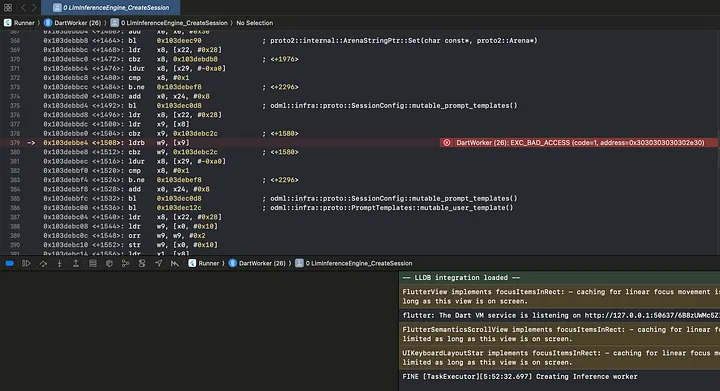
The biggest challenge was the native linking error (symbol not found). The Flutter build tools failed to automatically link the MediaPipe libraries to the final iOS app.
The solution was to manually create an ios/Podfile to declare the necessary native dependencies. This step was necessary because the build tools didn't automatically link the libraries, and it ensures CocoaPods correctly integrates the MediaPipe libraries into the final app.
ios/Podfile:
After creating this file, you must run pod install in the ios directory.
3. Dart Code (main.dart)
The application logic handles loading the model from assets and running inference. The key step is copying the large model file to a local directory so native code can access it directly.
Engine Initialization:
Generating Response: To get a real-time typing effect, we listen to the Stream returned by generateResponse and update the UI with each text chunk.
Conclusion
Through this experiment, we confirmed that it is fully feasible to run the Gemma 3 1B model on iOS using a combination of Flutter and MediaPipe. In particular, utilizing the NPUNeural Processing Unit, Apple Neural Engine equipped in latest iPhone models allows for expecting a satisfactory token generation speed. However, issues such as memory constraints and consequent performance degradation due to CPU loading instead of NPU loading, battery consumption and heat generation, and performance degradation due to throttling may occur.
The iPhone 13 Pro used for testing by the author is equipped with the A15 Bionic chipset, which contains a 16-core Neural Engine capable of performing 15.8 trillion operations per second (15.8 TOPS). Apple started including NPUs from A11 Bionic, and this hardware accelerator is utilized through the Metal acceleration system. In other words, while using the Metal backend software-wise, the actual heavy matrix operations are handled by this NPU, enabling performance of about 20~40 tokens/sec. Detailed specs of the Neural Engine and its optimization for Transformer architectures can be found in Apple's Machine Learning Research. As documented, the Apple Neural EngineANE[26] is designed to efficiently handle Transformer model inference workloads, minimizing app memory impact and device battery consumption.
However, there are a few caveats for actual on-device deployment.
- Memory Constraints: Even for a 1B model, if Quantization[27] is not applied or if the text context becomes long, it may reach the limit of the iPhone's Unified Memory. Especially in older models with 6GB RAM, there is a risk of the app forcibly terminating.
- Heat and Throttling: Using NPU and GPU at full load causes device heat to rise rapidly. iOS triggers throttling to limit performance for device protection, which can cause inference speed to drop strictly.
- CPU Fallback: If specific operators are not optimized for Metal shaders or if memory is insufficient, MediaPipe may automatically switch to CPU mode. In this case, performance can drop to 1/10 level, so verification through profiling is necessary.
Nevertheless, the ability to run a 1B model supporting a 32K context window in an offline mobile environment will be a very attractive option for developing on-device AI applications where privacy is important. At this point, experimental features (native-assets) and manual configuration are required, but easier integration is expected as the Toolchain matures.
Footnotes
- 1: A term referring to the highest performance models at the forefront of the artificial intelligence field [↩︎]
- 2: A model where the weights (parameters) and architecture are released, but the training data and full training pipeline are not fully disclosed [↩︎]
- 3: 1 Billion, meaning 1 billion parameters [↩︎]
- 4: 4-bit Integer Quantization, a technique to reduce model size [↩︎]
- 5: Google's lightweight machine learning framework for on-device inference [↩︎]
- 6: Instruct Tuned, a model fine-tuned to follow user instructions, suitable for chat and Q&A [↩︎]
- 7: Evaluates the ability to understand the context of a sentence and predict the most appropriate ending [↩︎]
- 8: Evaluates the ability to read a given paragraph and answer questions that can be answered with Yes/No [↩︎]
- 9: Evaluates the ability to choose common-sense solutions to everyday physical situations [↩︎]
- 10: Evaluates the ability to infer people's actions and reasons in social situations [↩︎]
- 11: Evaluates the ability to answer questions asking for factual knowledge on various topics [↩︎]
- 12: Evaluates the ability to find answers in Wikipedia documents based on real Google search queries [↩︎]
- 13: Evaluates elementary/middle school science problems that are difficult to solve by search alone [↩︎]
- 14: Evaluates relatively easy elementary/middle school science problems [↩︎]
- 15: Evaluates the ability to figure out what ambiguous pronouns refer to depending on context [↩︎]
- 16: A benchmark collecting difficult tasks of various difficulty levels that current language models struggle with [↩︎]
- 17: Evaluates the ability to read text and perform arithmetic operations based on the information contained therein [↩︎]
- 18: The amount of tokens that can be processed at once. 32K means about 24,000 words of long documents can be input at once [↩︎]
- 19: Size of the layer transforming words into high-dimensional vectors, determining the complexity of meaning the model can represent [↩︎]
- 20: Represents the depth of the model, affecting inference ability and complex pattern learning capability [↩︎]
- 21: Number of heads performing attention mechanisms in parallel, allowing information processing from various perspectives [↩︎]
- 22: May be fewer than query heads if GQAGrouped Query Attention is applied, improving memory efficiency [↩︎]
- 23: Unsupervised text tokenizer and detokenizer developed by Google [↩︎]
- 24: Foreign Function Interface, an interface for calling functions written in other languages [↩︎]
- 25: On-device machine learning solution provided by Google, supporting various modalities like vision, text, audio, etc. [↩︎]
- 26: A hardware accelerator built into Apple Silicon chips optimized for machine learning tasks [↩︎]
- 27: Optimization technique that reduces memory usage and computation costs by lowering model parameter precision (e.g., 32-bit float -> 4-bit integer) [↩︎]
Recommended Articles
Antigravity Agent Architecture and Evaluation Loop Design
An Antigravity agent architecture that separates evaluation evidence, local revision, validation, and save authority.
Discrete Language Diffusion: Global Refinement on JAX/TPU
A deep dive into implementing Discrete Masked Language Diffusion using JAX and Flax NNX. We explore transition schedules, bidirectional architectures, and performance optimization for TPU v6e.